
EDI models Last updated: 2026-10-08
An EDI model is the implementation guide in a form a program can read. It names the loops, segments and data elements, the order they appear in, which of them are required, and how long a value may be. ediFabric reads the model you give it, whether that is the HIPAA 837P, an X12 850 or a trading partner's own guide. Change the model and the same parser, validator and writer follow the new guide.
That is the point of a template. The published model is the baseline from the standard. A trading partner's guide is often a change to that baseline: a different code set, an extra element, a mandatory element that the standard left optional, a loop in another position. You change the model until it matches the file, and the reader stays the same.
Convert between EDI and JSON uses HIPAA 5010 837P to show the JSON those property names produce. This page is how the model behind that JSON is written, and how you change it.
Two forms
The same transaction is published in two forms. The property names are the same in both, and they are the names in the JSON.
| Form | Used by | What you edit |
|---|---|---|
| C# EDI template | ediFabric .NET | C# classes with ediFabric attributes. The reader loads the assembly. |
| OpenEDI | ediFabric Native and ediFabric Cloud | An OpenAPI 3 schema. Cloud reads that schema. Native reads the intermediary file you download from it. |
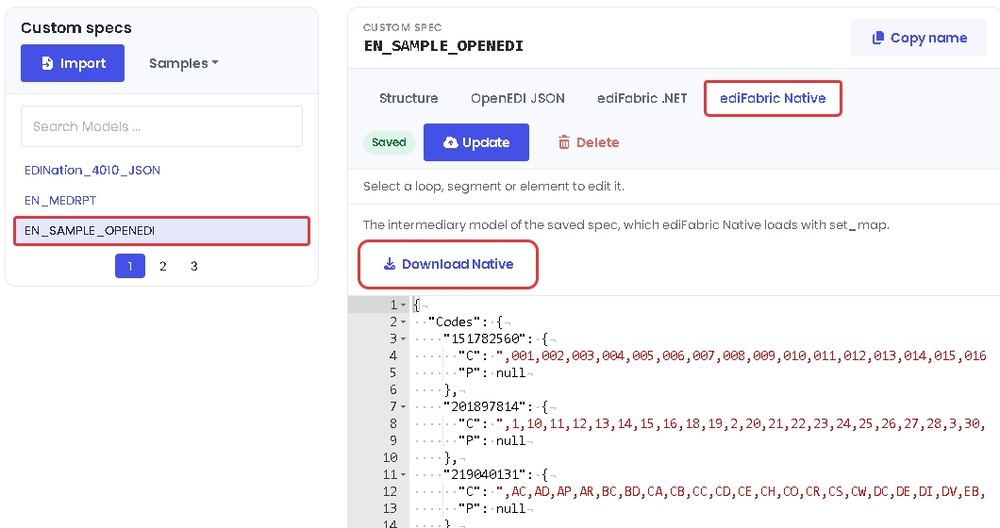
Every standard model is in the EDI spec library. HIPAA 5010 837P is model EdiNation.X12.HIPAA.005010, message 837P, version 005010X222A1. Select Download OpenEDI on the OpenEDI JSON tab for the schema, or Download Native on the ediFabric Native tab for the file Native loads. The C# for the same claim is EdiFabric.Examples.X12.T837P.DB, class TS837P in EdiFabric.Templates.Hipaa5010.
The same guide in both forms
A guide and a model use the same facts. The C# attributes and the OpenEDI extensions are two spellings of those facts. Customize EDI guidelines is the C# spelling. OpenEDI format is the OpenAPI spelling.
| In the guide | C# template | OpenEDI |
|---|---|---|
| Transaction, version and id | [Message("X12", "005010X222A1", "837")] on a class that extends EdiMessage | x-openedi-message-standard, x-openedi-message-version, x-openedi-message-id |
| Position | [Pos] | The order of properties |
| Mandatory | [Required] | The required array |
| Repeats | List<> and [ListCount] | type: array, with minItems and maxItems |
| Segment | [Segment("BHT")] | x-openedi-segment-id |
| Loop | [Group] on the class of the trigger segment | x-openedi-loop-id |
| Data element | A string property. [DataElement("127", typeof(X12_AN))] is the element id and the type | A string property. x-openedi-element-id is the element id. format is the type, such as X12_AN |
| Length | [StringLength(1, 50)] | minLength and maxLength |
| Code set | [EdiCodes] | enum |
| Several items at one position | [All], [OneOf], [SeqOf] | x-openedi-group-type: anyOf, oneOf, seqOf |
| Syntax and situational rules | Conditional attributes such as paired, required-if and exclusion | x-openedi-syntax and x-openedi-situational |
The 837P message in the C# template:
[Message("X12", "005010X222A1", "837")]
public class TS837P : EdiMessage
{
    [Pos(1)]
    public virtual ST ST { get; set; }

    [Required]
    [Pos(2)]
    public virtual BHT_BeginningOfHierarchicalTransaction_8 BHT_BeginningOfHierarchicalTransaction { get; set; }

    [Required]
    [Pos(3)]
    public virtual All_NM1_837P_6 AllNM1 { get; set; }

    [Required]
    [Pos(4)]
    public virtual List<Loop_2000A_837P> Loop2000A { get; set; }

    [Pos(5)]
    public virtual SE SE { get; set; }
}
The same message in OpenEDI. Property order is the position. Loop2000A is an array because the loop repeats.
{
  "TS837P": {
    "type": "object",
    "x-openedi-message-id": "837",
    "x-openedi-message-standard": "X12",
    "x-openedi-message-version": "005010X222A1",
    "properties": {
      "ST": { "$ref": "#/components/schemas/ST" },
      "BHT_BeginningOfHierarchicalTransaction": { "$ref": "#/components/schemas/BHT_BeginningOfHierarchicalTransaction_8" },
      "AllNM1": { "$ref": "#/components/schemas/All_NM1_837P_6" },
      "Loop2000A": { "type": "array", "items": { "$ref": "#/components/schemas/Loop_2000A_837P" } },
      "SE": { "$ref": "#/components/schemas/SE" }
    }
  }
}
BHT element 127 is SubmitterTransactionIdentifier_03 in both forms. In C# the length and the element id are attributes. In OpenEDI they are JSON Schema keywords and x-openedi-element-id.
[Required]
[StringLength(1, 50)]
[DataElement("127", typeof(X12_AN))]
[Pos(3)]
public string SubmitterTransactionIdentifier_03 { get; set; }
{
"SubmitterTransactionIdentifier_03": {
"type": "string",
"format": "X12_AN",
"minLength": 1,
"maxLength": 50,
"x-openedi-element-id": "127"
}
}Parsing 837P produces JSON with these names. The claim itself is on the 837P transaction page, and the path from EDI to that JSON in each product is in Convert between EDI and JSON.
Change the model to match the file
Keep the baseline model as you received it, and put partner changes in a separate copy. A partner file can differ in any of these ways:
- A code set is shorter, or it contains a private code.
- An optional element is mandatory, or a mandatory element is optional.
- A segment has an extra element.
- A loop or a segment sits in a different position, or it repeats a different number of times.
- You want a property on the class that is not part of the EDI, for your own application.
Change the C# template
ediFabric .NET has two ways, both in How to modify EDI templates. Derive a new class and hide the properties you change with the new keyword, or copy the template files into a partner project and edit the copy. Derived classes keep the original attributes. Load the partner assembly, or a type factory, when the interchange is from that partner, and load the baseline otherwise.
To make one element mandatory, add [Required]. To allow only the codes a partner sends, replace the [EdiCodes] class named by [DataElement]. To add an element, add a string property at the next [Pos]. A property with no template attributes is ignored by the reader and the writer, which is how you hang application data on the same object. Validate EDI with templates is the full set: [Required], [ListCount], [StringLength], [DataElement], and the conditional attributes for syntax notes and HIPAA situational rules. Call IsValid() on the parsed object.
Download the baseline as C# from the EDI spec library. Every plan, Community or paid, uses the same C# templates. EDI templates and How to install EDI templates show how to add them to a project. Convert between EDI and JSON is the read and write that uses the class.
Change the OpenEDI schema
Open the model in the EDI spec library and select Customize in Spec Builder, or import a file in the EDI spec builder. The builder imports an OpenEDI JSON file or a SEF file. The builder's OpenEDI JSON tab is the OpenEDI schema. Edit it there. The same change as [Required] in C# is adding the property name to the schema's required array. A new element is a new property. A partner code set is a shorter enum. minLength and maxLength are the length.
When the schema matches the partner guide, select Update, then download the spec from its tabs:
- Download Native, on the ediFabric Native tab, saves the intermediary file. Pass it to
set_map. ediFabric Native does not read the OpenEDI file or the C# template. The steps for 837P are in Convert between EDI and JSON for ediFabric Native. - Download C#, on the ediFabric .NET tab, saves the C# template, one file with its own segments, composites and codes. Add it to a class library, as described in Use a custom template.
- Download OpenEDI, on the OpenEDI JSON tab, saves the schema you edited. That file is also the input for the class generators below.
Update uploads the model to your ediFabric Cloud subscription. A custom model is not selected on its own. Pass it as the model query parameter on read, or set the Model property on the transaction. Create and import EDI specs is that upload, and EDI models is how Cloud resolves a model from the file when you do not name one. Convert between EDI and JSON for ediFabric Cloud is the 837P read and write.
Generate a class from OpenEDI
OpenEDI is an OpenAPI 3 schema, so a generator that reads OpenAPI can emit a class in Python, Java, TypeScript, Go, Rust or C with the same property names as TS837P. The class is for your application. It is how your code holds the JSON that Native parse or Cloud /read returns. It is not the file the engine loads. Native still needs the intermediary from Download Native. Cloud still needs the OpenEDI model. .NET still needs the C# template.
Generators copy type, required, minLength, maxLength, enum and $ref. They do not copy x-openedi-*, and they do not understand format: X12_AN. Element ids and EDI types stay in the OpenEDI file.
Download en-837P-openedi.json from the 837P spec or from the spec builder, then generate.
Python
datamodel-code-generator writes Pydantic models. This command reads the 837P OpenEDI file:
pip install datamodel-code-generator
datamodel-codegen --input en-837P-openedi.json --input-file-type openapi --output hipaa_837p.py --use-annotated
The start of the output is the ST segment, the BHT segment, and the message. TransactionSetIdentifierCode_01 keeps the length from the schema. The tool drops underscores from the BHT class name and, because the field ST has the same name as its class, it emits that field as ST_1 with alias='ST'. The JSON key is still ST. Every other loop and segment in the file becomes a class the same way.
from __future__ import annotations

from typing import Annotated

from pydantic import BaseModel, Field


class ST(BaseModel):
    TransactionSetIdentifierCode_01: Annotated[str, Field(max_length=3, min_length=3)]
    TransactionSetControlNumber_02: str
    ImplementationConventionPreference_03: str | None = None


class BHTBeginningOfHierarchicalTransaction8(BaseModel):
    HierarchicalStructureCode_01: str | None = None
    TransactionSetPurposeCode_02: str | None = None
    SubmitterTransactionIdentifier_03: Annotated[
        str | None, Field(max_length=50, min_length=1)
    ] = None
    TransactionSetCreationDate_04: str | None = None
    TransactionSetCreationTime_05: str | None = None
    TransactionTypeCode_06: str | None = None


class TS837P(BaseModel):
    ST_1: Annotated[ST | None, Field(alias='ST')] = None
    BHT_BeginningOfHierarchicalTransaction: BHTBeginningOfHierarchicalTransaction8 | None = None
Other Python generators that read the same file:
- OpenAPI Generator, generator
pythonorpython-pydantic-v1. - quicktype, which emits Python from the JSON Schema inside the OpenAPI document.
Java, Node.js, Go, Rust and C
The same en-837P-openedi.json is the input.
- Java. OpenAPI Generator with
-g javaemits a POJO per schema. jsonschema2pojo emits Java from the JSON Schema. quicktype emits Java as well. - C. OpenAPI Generator with
-g cemits a struct per schema, as part of its C client. C has no classes. quicktype emits C++ and Objective-C from the same schema; for ISO C, use OpenAPI Generator. - Node.js and TypeScript. OpenAPI Generator with
-g typescript-nodeemits a model class per schema. openapi-typescript emits TypeScript types, and quicktype emits TypeScript as well. - Go. OpenAPI Generator with
-g goemits a struct per schema with JSON tags. oapi-codegen and quicktype emit Go structs too. - Rust. OpenAPI Generator with
-g rustemits a struct per schema with serde derives. quicktype emits serde structs as well.
SwaggerHub can import the OpenEDI file and generate a client in those languages. That path is also noted under Model SDKs.
openapi-generator-cli generate -i en-837P-openedi.json -g java -o ./java
openapi-generator-cli generate -i en-837P-openedi.json -g typescript-node -o ./typescript
openapi-generator-cli generate -i en-837P-openedi.json -g go -o ./go
openapi-generator-cli generate -i en-837P-openedi.json -g rust -o ./rust
openapi-generator-cli generate -i en-837P-openedi.json -g c -o ./c
Where to read on
- Convert between EDI and JSON reads 837P and writes it back in .NET, Native and Cloud.
- Customize EDI guidelines, How to modify EDI templates, Validate EDI with templates, EDI templates and How to install EDI templates.
- OpenEDI format and EDI models for Cloud. Model operations is the API that lists and deletes models on a subscription.
- View and download EDI specs and Create and import EDI specs.
- OpenEDI specification.