
Convert between EDI and JSON Last updated: 2026-10-08
ediFabric Native converts X12 to JSON and JSON back to X12 inside your process. This example is a HIPAA 5010 837P professional claim. The property names in the JSON come from the model, which is the same layout as the ediFabric EDI template and the OpenEDI schema. How the three products share that model is in Convert between EDI and JSON.
Download the 837P model
Open 837P in the EDI spec library. On the ediFabric Native tab, select Download Native. That saves en-837P-efnative.json.
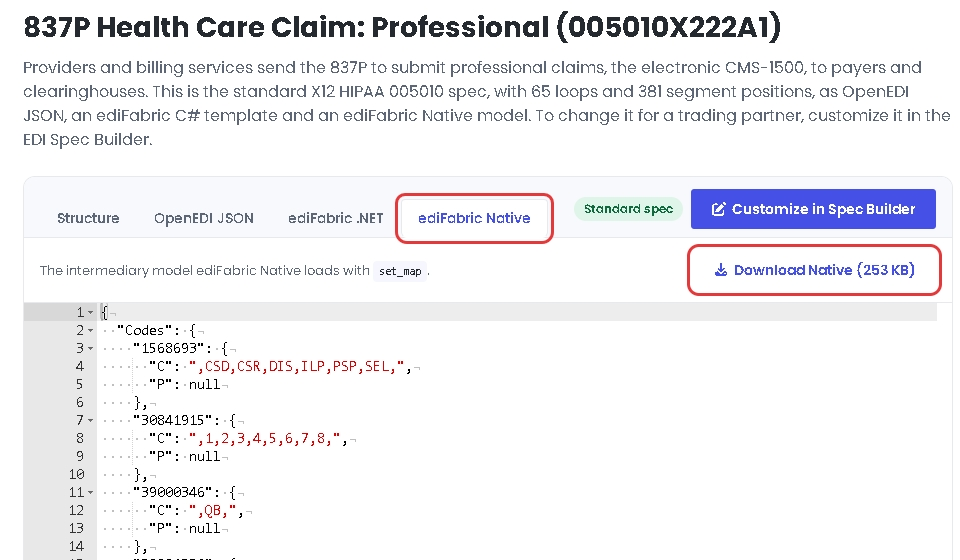
That file is the intermediary the engine loads. It is not the JSON your application reads or writes. It holds the compiled layout under Messages, Segments, Groups, Elements, Composites, Codes, Terms and Rules. The message entry:
{
  "Messages": {
    "837P_EdiNation.X12.HIPAA.005010": {
      "Format": "X12",
      "Model": "EdiNation.X12.HIPAA.005010",
      "Type": "837P",
      "Version": "005010X222A1"
    }
  }
}
Download OpenEDI, on the OpenEDI JSON tab, saves the OpenAPI definition, en-837P-openedi.json. To change the model, customize it in the EDI Spec Builder, then select Download Native on the spec's ediFabric Native tab to refresh the file the engine loads. Every plan, Community or paid, uses the same models. The extensions are documented in OpenEDI format.
Load the model
Put en-837P-efnative.json in a directory next to your program and map version 005010X222A1 to it. Call set_map once, after set_serial and before parse. In Python:
import json
import edifabric_x12 as ef

serial = "YOUR_SERIAL_KEY"
ef.load_library()
ef.set_serial(serial)
ef.set_map(json.dumps({
    "default": None,
    "maps": {
        "837:005010X222A1": {
            "type": 1,
            "name": "en-837P-efnative.json",
            "location": "models"
        }
    }
}))
type: 1 loads a local file from location/name. default is the serial key when you want unmapped transactions to use the online model service. It is null here because this map already names the 837P. The same JSON is passed to setMap in the Java and Node.js bindings, to SetMap in the Go and C# bindings, to ef::set_map in the Rust bindings, and to ef_set_map in the C bindings.
Read an 837P file
parse with ParseMode.JSON_VALIDATE writes the transaction JSON, then a validation report. The offset is where the report starts. Everything before it is the 837P JSON:
edi = open("Claim.txt", "rb").read()
output, offset = ef.parse(edi, ef.ParseMode.JSON_VALIDATE)
transactions = output[:offset]
report = json.loads(output[offset:])
print(transactions)
print(report["errors_count"])
ParseMode.JSON returns the transaction JSON only, and the offset is 0. Operation modes are in the Native introduction.
Every binding makes the same three calls with the same JSON, so this example reads the same in each language:
| Language | Load the model | Read EDI to JSON | Write JSON to EDI |
|---|---|---|---|
| Python | ef.set_map(map_json) | ef.parse(edi, ef.ParseMode.JSON_VALIDATE) | ef.build(transactions, postfix="\r\n") |
| Java | EdiFabricX12.setMap(mapJson) | EdiFabricX12.parse(edi, ParseMode.JSON_VALIDATE) | EdiFabricX12.build(transactions, "\r\n") |
| Node.js | ef.setMap(mapJson) | ef.parse(edi, ef.ParseMode.JSON_VALIDATE) | ef.build(transactions, "\r\n") |
| Go | ef.SetMap(mapJSON) | ef.Parse(edi, ef.ParseJSONValidate, nil) | ef.Build(transactions, "\r\n") |
| Rust | ef::set_map(&map_json)? | ef::parse(&edi, ef::ParseMode::JsonValidate, None)? | ef::build(transactions, Some("\r\n"))? |
| C# | EdiFabricX12.SetMap(mapJson) | EdiFabricX12.Parse(edi, ParseMode.JsonValidate) | EdiFabricX12.Build(transactions, "\r\n") |
| C | ef_set_map(map_json) | ef_parse(edi, EF_PARSE_JSON_VALIDATE, NULL, &result) | ef_build(transactions, "\r\n", &edi) |
The JSON
The transaction JSON uses the names from the EDI template and the OpenEDI schema. ST element 143 is TransactionSetIdentifierCode_01. See how an EDI template names each element and how OpenEDI names the same element.
{
  "ST": {
    "TransactionSetIdentifierCode_01": "837",
    "TransactionSetControlNumber_02": "0021",
    "ImplementationConventionPreference_03": "005010X222A1"
  },
  "BHT_BeginningOfHierarchicalTransaction": {
    "HierarchicalStructureCode_01": "0019",
    "TransactionSetPurposeCode_02": "00",
    "SubmitterTransactionIdentifier_03": "244579",
    "TransactionSetCreationDate_04": "20061015",
    "TransactionSetCreationTime_05": "1023",
    "TransactionTypeCode_06": "CH"
  }
}
The rest of this claim, through the service lines, is on the 837P transaction page.
Write the JSON back to EDI
build takes the transaction JSON from parse, or JSON your application built in that shape, and returns X12. postfix is written after each segment terminator.
transactions = open("Claim.json", "rb").read()
edi = ef.build(transactions, postfix="\r\n")
print(edi)
Java calls EdiFabricX12.build, Node.js ef.build, Go ef.Build, Rust ef::build, C# EdiFabricX12.Build and C ef_build. All of them take the same transaction JSON.