
Download Last updated: 2026-10-21
This page lists the ediFabric Native library files you download for each platform. The distribution contains one native library per platform, per EDI standard. X12, including HIPAA, is available today. EDIFACT, NCPDP, HL7 and the other standards are being released one at a time.
The packages for Python, Java, Node.js, Go, Rust and C# already bundle these files, so you only need a download for C, C++ or a language without an official binding. The install commands are in Language Bindings.
ediFabric X12 Tools
The library files for ediFabric X12 Tools are:
| Platform | File | x64 | arm64 |
|---|---|---|---|
| Windows | edifabric-x12-tools.dll |
Download (.zip 3.48 MB) | Not available |
| Linux | edifabric-x12-tools.so |
Download (.zip 4.16 MB) | Download (.zip 3.84 MB) |
| macOS | edifabric-x12-tools.dylib |
Not available | Download (.zip 3.50 MB) |
Plus your model files (per transaction set) and a map file that tells the engine where to find them.
After you download the library, drop it to the same folder as your executable (or different folder - configure the path in the bindings).
Verify downloaded files
Windows
All binaries are signed with Authenticode. To verify - run in PowerShell:
Get-AuthenticodeSignature edifabric-x12-tools.dll | Format-List
Linux
All binaries are signed with detached signature (.asc). Download and import the EdiFabric public signing key once, and check that its fingerprint is B538 12FB CAF1 F5D1 1B23 EC93 93B0 9965 4C69 8B36:
curl -O https://www.edifabric.com/files/edifabric-signing-key.ascgpg --import edifabric-signing-key.ascgpg --fingerprint B53812FBCAF1F5D11B23EC9393B099654C698B36
Then verify each library - run in bash:
gpg --verify edifabric-x12-tools.so.asc edifabric-x12-tools.soecho $? # 0 = success
The output should say Good signature from "support@edifabric.com". GnuPG may also warn that the key is not certified with a trusted signature. That is expected unless you sign the key locally; the fingerprint check confirms the key is ours.
macOS
All binaries are signed with Codesign. To verify - run in bash:
codesign --verify --verbose edifabric-x12-tools.dylibcodesign --display --verbose=2 edifabric-x12-tools.dylib
Language Bindings
Official bindings and examples for each programming language are on GitHub. The packages bundle the library for every supported platform:
| Language | Install | GitHub Repository |
|---|---|---|
| Python | PyPI: pip install edifabric-x12 |
edifabric-python-bindings |
| Java | Maven Central: com.edifabric:edifabric-x12-native |
edifabric-java-bindings |
| Node.js | npm: npm install edifabric-x12 |
edifabric-nodejs-bindings |
| Go | Go modules: go get github.com/EdiFabric/edifabric-go-bindings |
edifabric-go-bindings |
| Rust | crates.io: cargo add edifabric-x12 |
edifabric-rust-bindings |
| C# | NuGet: dotnet add package EdiFabric.Native.X12 |
edifabric-csharp-bindings |
| C and C++ | Download the library above and include edifabric_x12.h |
edifabric-c-bindings |
All bindings conform to the C ABI.
EDI Models
Every X12 transaction, such as 837P, 834 or 850, is described by a model, a JSON file that the engine loads with set_map. Every plan, Community or paid, uses the same models. Download a standard model from the EDI spec library, or a custom model from the EDI Spec Builder, where you create and change models in the OpenEDI format.
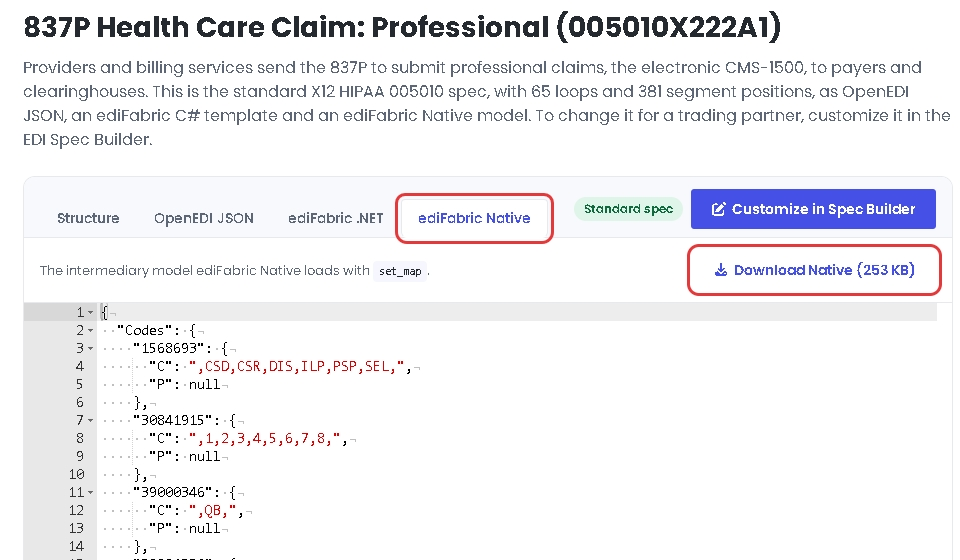
To download a standard model, open the transaction in the EDI spec library, select the ediFabric Native tab, then select Download Native:
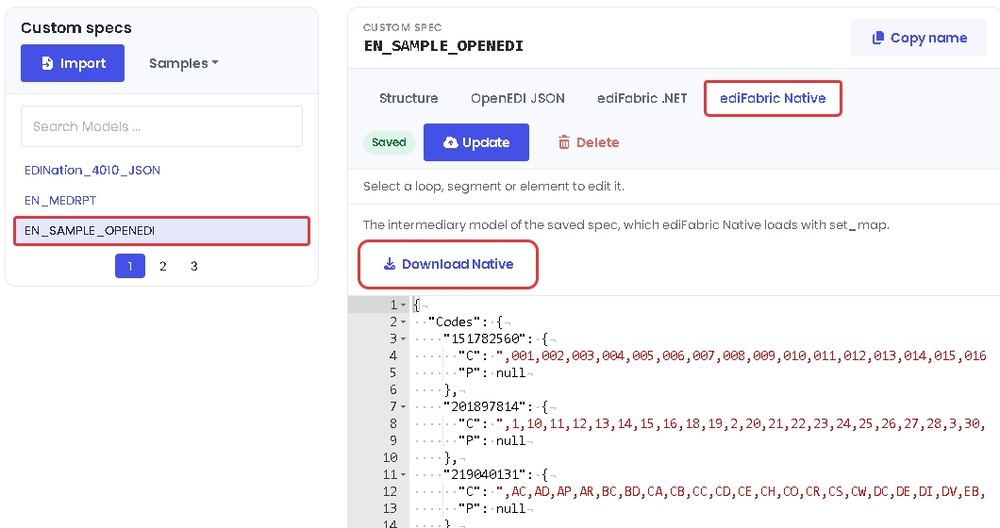
To download a custom model, select it in the EDI Spec Builder, select the ediFabric Native tab, then select Download Native:
Save the file where the map can find it. How to build the map is in EDI models.