
Introduction Last updated: 2026-10-16
ediFabric Native is a self-contained, high-performance EDI engine compiled ahead-of-time to a native shared library. It converts EDI to JSON (and back), validates transaction sets, and generates acknowledgments — callable from any language with a C foreign-function interface (C, C++, Rust, Go, Python, Node.js, Java/JNA, .NET, …). The target machine needs only the library file.
This page is the reference for developers integrating ediFabric Native: the package, requirements, a quick start, language bindings, licensing, the C API, configuration, error codes, and threading.
- Fast — native code, zero-copy UTF‑8 buffers, streaming split/merge.
- Portable — a single native library per platform, no runtime install.
- Simple ABI — a handful of C entry points returning integer status codes.
Use of this library requires a valid license (see Licensing).
Package
The distribution contains one native library per platform, per EDI standard. X12, including HIPAA, is available today. EDIFACT, NCPDP, HL7 and the other standards are being released one at a time.
The library files for ediFabric Native X12 are:
| Platform | File |
|---|---|
| Windows | edifabric-x12-tools.dll |
| Linux | edifabric-x12-tools.so |
| macOS | edifabric-x12-tools.dylib |
Plus your model files (per transaction set) and a map file that tells the engine where to find them.
Requirements
- A supported 64-bit OS (Windows / Linux / macOS).
- Internet access for the license check. Community (
set_serial) checks on each operation. Developer (ensure_token) checks when the one-day cache refreshes. Enterprise (set_token) does not call out after the token is set. - No .NET, JVM, or other dependency runtime — the library is fully self-contained.
Quick start
- Install the package for your language: Python, Java, Node.js, Go, Rust or C#. Each package bundles the library. For C, C++ or any other language, download the library from here and drop it in the same folder as your executable (or a different folder - configure the path in the bindings).
- Load the library with the binding, or with your language's FFI.
-
Authorize with the call for your plan (see Licensing). On Community that is
set_serial. -
Load the model map once with
set_map. -
Parse EDI to JSON with
parse(or stream withstart_split/split).
set_serial(serial)        // Community. Developer: ensure_token. Enterprise: set_token
set_map(mapJson)          // once
parse(edi, mode=1, …)     // EDI → JSON
All strings and payloads cross the boundary as UTF‑8 byte buffers (pointer + length). Every function returns 0 on success or a non-zero error code.
Language bindings and examples
Official bindings and examples for each programming language are on GitHub. The packages bundle the library for every supported platform, so installing one is all it takes to parse, validate and convert X12 to JSON:
| Language | Install | GitHub Repository |
|---|---|---|
| Python | PyPI: pip install edifabric-x12 |
edifabric-python-bindings |
| Java | Maven Central: com.edifabric:edifabric-x12-native |
edifabric-java-bindings |
| Node.js | npm: npm install edifabric-x12 |
edifabric-nodejs-bindings |
| Go | Go modules: go get github.com/EdiFabric/edifabric-go-bindings |
edifabric-go-bindings |
| Rust | crates.io: cargo add edifabric-x12 |
edifabric-rust-bindings |
| C# | NuGet: dotnet add package EdiFabric.Native.X12 |
edifabric-csharp-bindings |
| C and C++ | Download the library and include edifabric_x12.h |
edifabric-c-bindings |
The Go library is embedded by the optional github.com/EdiFabric/edifabric-go-bindings/native module. Import it once with import _ "github.com/EdiFabric/edifabric-go-bindings/native".
All bindings conform to the C ABI. Follow the same UTF‑8 buffer + grow-and-retry + get_result contracts from any other FFI-capable language.
Licensing
To evaluate without an account, use the demo serial key bd96a836feca45cb91c86ee65d281f52. It works for ediFabric Native, .NET, and Cloud, and has a limited quota. When it runs out, sign up free for Community and copy your own serial from Your account. The same serial covers ediFabric .NET, Native, and Cloud. Community never expires, needs no credit card, and is for non-production use. The first 14 days after you subscribe have unlimited operations, then the quota is 250 per day. To extend the unlimited period, ask through the support portal or at support@edifabric.com. One operation is one parse, generate, validate, or acknowledge call, shared across all three products. Past that quota the call returns error 639.
Call one of these before parse or build. Buffers are UTF-8, pointer + length, same as the rest of the ABI.
| Plan | What works | Call this |
|---|---|---|
| Community |
set_serial only. Online check on each operation. 250 operations per day. Non-production. |
set_serial |
| Developer |
set_serial and ensure_token. ensure_token caches the result in the process for 1 day. get_token is not available (error 628). |
ensure_token |
| Enterprise |
set_serial, get_token, and set_token. Offline tokens last 30 days by default, or 90 or 180 days on request. |
set_token |
set_serial(serial)                    // Community: online check

ensure_token(serial, seconds)        // Developer: 1-day cache; pass seconds to refresh early

get_token(serial) → token             // Enterprise, on a host with internet
set_token(token)                      // Enterprise: per process start, no license call
During an Enterprise trial, use set_token. Query get_token_expiration and refresh with get_token before the token expires. Up to 10,000 token requests per day are allowed across .NET and Native. If you exceed the rate, wait 60 seconds (error 636). A seat is one environment: Community leases 3, Developer leases 3, Enterprise is unlimited.
Use of the product is subject to the EULA. Upgrading is a serial-key swap; then switch to the call in the table.
| Entry point | Signature | Purpose |
|---|---|---|
ensure_token |
int ensure_token(byte* serial, int len, int seconds) |
Cache a token for this process. |
get_token |
int get_token(byte* serial, int len, byte* out, int cap, int* outLen) |
Fetch a signed token (grow-and-retry). |
set_token |
int set_token(byte* token, int len) |
Cache a token for this process. |
validate_token |
int validate_token(byte* token, int len) |
Validate a token without caching. |
get_token_expiration |
int get_token_expiration(long* expUtc) |
Token expiry (UTC ticks; 0 = none). |
set_serial |
int set_serial(byte* serial, int len) |
Cache a serial for runtime auth. |
get_app_version |
int get_app_version(int* version) |
Library application version. |
API reference
Conventions used by every function:
- Returns
int:0= success, non-zero = error code. - Inputs are UTF‑8
byte*+int length. - Output functions use grow-and-retry: if the buffer is too small the call returns
1(InsufficientCapacity) and writes the required size into the length out-parameter; reallocate and call again. - Exceptions never cross the boundary.
Model
int set_map(byte* map, int mapLength);Loads the template map that resolves EDI transaction sets to model files. Call once before any parse/split. Cached until replaced.
Parse
int parse(byte* input, int inputLength,
          int mode,
          byte* config, int configLength,
          byte* output, int outputCapacity,
          int* outputLength, int* outputOffset);
Parses a whole interchange in one call.
-
mode— see operation modes. -
config— optional ParseConfig JSON (nullallowed). - Output = transaction-set JSON, followed by validation/ACK JSON when
mode ≥ 2:-
*outputOffset= start of the errors/ACK section (0whenmode == 1). -
*outputLength= total bytes written.
-
Split (streaming)
int start_split(byte* input, int inputLength, int mode, byte* config, int configLength);
int split(int* resultSize, int* resultOffset, byte* last);
Streams one transaction set at a time (low, flat memory use for large files).
-
configmust include asplitsection with asegment_id. - Call
splitrepeatedly; for each step with*resultSize > 0, fetch the payload withget_result.*last == 1marks the final result.
Build
int build(byte* input, int inputLength,
          void* postfix,
          byte* output, int outputCapacity, int* outputLength);
Builds an X12 EDI string from transaction-set JSON. postfix is an optional null-terminated string appended after each segment terminator (e.g. "\r\n"); pass null for compact output. Grow-and-retry as with parse.
Merge (streaming)
int start_merge(byte* input, int inputLength);
int merge(int* resultSize);
Streams X12 segments from a full interchange JSON document. Each merge returns one segment (fetch with get_result); *resultSize == 0 ends the stream.
Results & errors
int    get_result(byte* buffer, int bufferSize);   // copy the last split/merge result
void* get_error(int errorCode); // null-terminated message string-
get_result—bufferSizemust equal theresultSizereturned by the precedingsplit/mergecall. The internal buffer is consumed on success. -
get_error— returns a human-readable message. The caller must free the returned string (free/Marshal.FreeHGlobal).
Logging & lifecycle
int init_logger(byte* pathUtf8, int pathLen, int minLevel);  // 0=Trace..4=Error
int shutdown_logger();
int clear_cache();   // reset model, split/merge state, results, license, logger
Operation modes
mode |
Output |
|---|---|
1 |
JSON only |
2 |
JSON + validation error report |
3 |
JSON + validation report + acknowledgment (999/997/TA1) |
Any other value returns IncorrectMode (616).
Configuration JSON
All JSON uses snake_case keys and is case-insensitive.
Template map (set_map)
Map keys are message:version. type: 1 loads the model from a local file at location/name. Set default to fall back to the online service for unmapped transaction sets. The value for default must be your serial key.
{
  "default": null,
  "maps": {
    "837:005010X222A1": { "type": 1, "name": "837P.json", "location": "/opt/models" },
    "834:005010X220A1": { "type": 1, "name": "834.json",  "location": "/opt/models" }
  }
}
Models
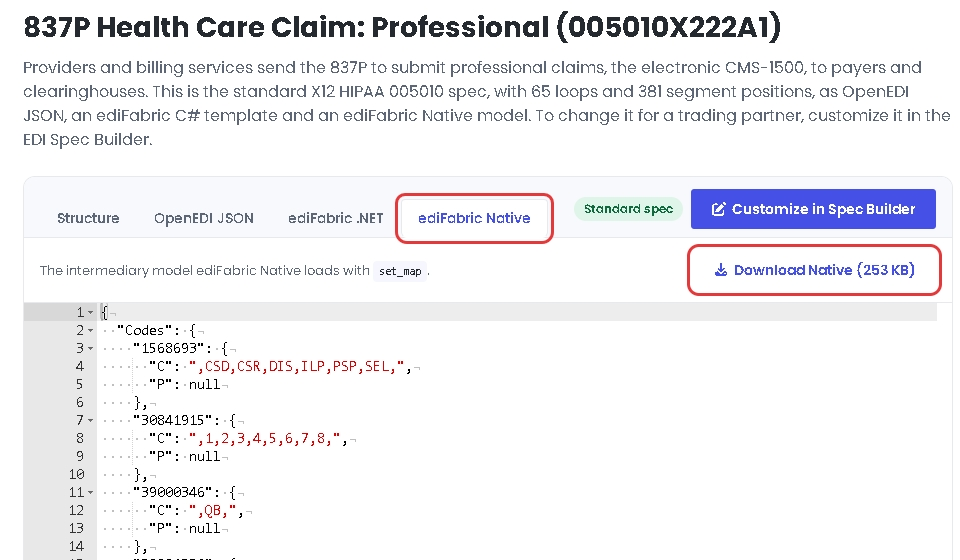
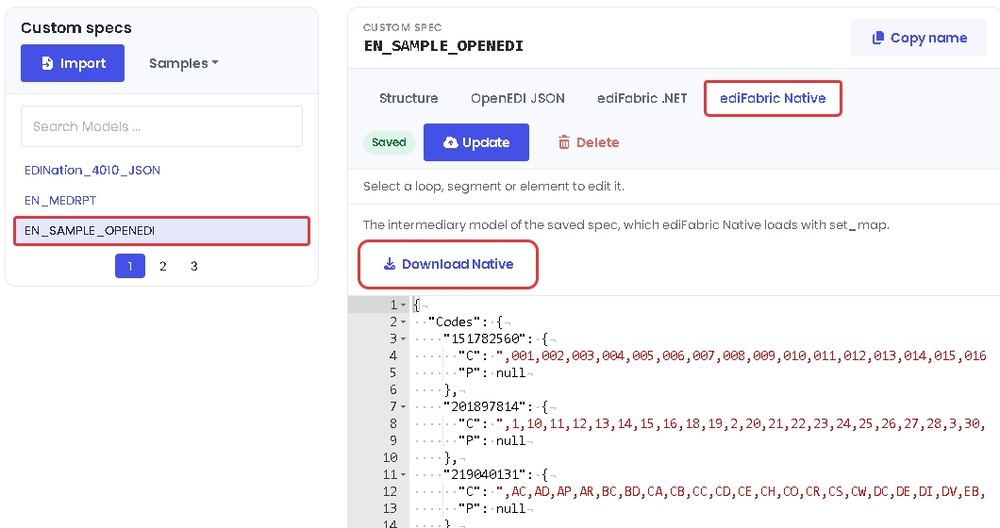
Every X12 transaction, such as 837P, 834 or 850, is described by a model, a JSON file that the engine loads with set_map. Every plan, Community or paid, uses the same models. Download a standard model from the EDI spec library, or a custom model from the EDI Spec Builder, where you create and change models in the OpenEDI format.
To download a standard model, open the transaction in the EDI spec library, select the ediFabric Native tab, then select Download Native:
To download a custom model, select it in the EDI Spec Builder, select the ediFabric Native tab, then select Download Native:
Save the file where the template map can find it. How to build the map is in EDI models.
ParseConfig (parse)
{
  "validate": { "regex": null, "date_format": null, "time_format": null,
                "skip_seq_count": false, "skip_hl_seq": false,
                "snip_level": 0, "max_errors": 0 },
  "ack":      { "supress_ta1": false, "ak901p": false,
                "gen_for_valid": false, "gen997": false }
}-
validate— applied whenmode ≥ 2;snip_levelis1–4. -
ack— applied whenmode == 3.
All sections are optional for parse.
SplitConfig (start_split)
{
  "split":    { "segment_id": "ST", "segment_depth": 0, "loop_id": null }
}-
split— required forstart_split;
Splitting is possible for the following boundaries:
-
ST- splits by transaction for files that contain batches of transactions. - Repeating loop - for files that contain batches of loops, such as order lines, claims or benefit enrollments.
The splitter must be configured as follows:
-
segment_id— the name of the segment to split by. It must be either ST or the first segment in the repeatable loop (Mandatory). -
segment_depth— the depth of the segment in the model hierarchy (Mandatory). -
loop_id— the name of the loop for the segment specified insegment_id(Optional).
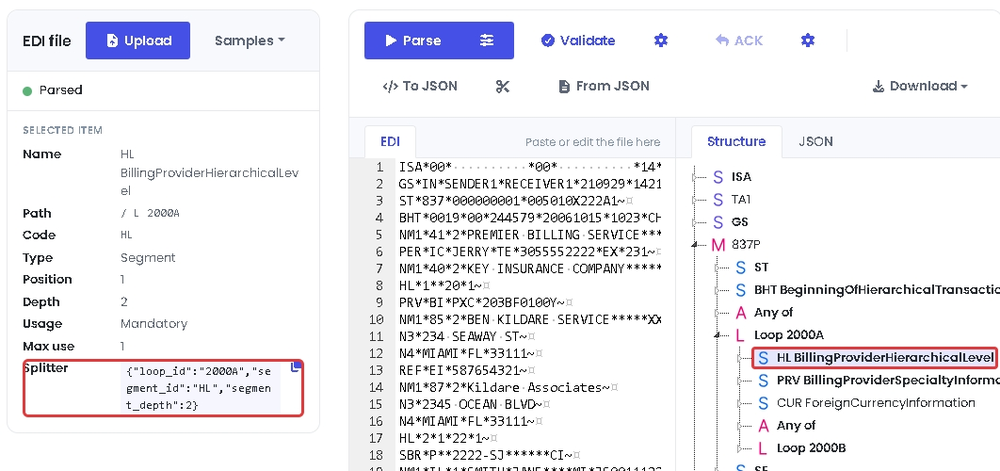
The values for the splitter are in the X12 Local Editor in EdiNation. Load a file, select Parse, and select the first segment of the loop in the Structure tab. For example, to split an 837P by loop 2000A, load the 837P sample from Samples and select the HL segment in loop 2000A. Under Selected item, segment_id is Code, loop_id is the last item in Path, and segment_depth is Depth.
The easiest way to get the splitter configuration is to select the copy button next to Splitter, which copies the three values as JSON. Paste them as the value of split.
If a segment shows no Splitter, the file can't be split by that segment.
Error codes
0 = success. Envelope/segment/element codes originate from the validation engine; the library-level codes are:
| Code | Meaning |
|---|---|
1 |
Output buffer too small — retry with the returned required size. |
501 |
Unknown. |
502 |
No internet access to the authentication API. |
503 |
Local map file has invalid paths or file names. |
611 |
Incorrect/empty input. |
612 |
Logger initialization error. |
613 |
Map JSON deserialization failed. |
614 |
Incorrect (negative) output capacity. |
615 |
Model map not set (call set_map first). |
616 |
Incorrect mode (must be 1–3). |
617 |
No JSON produced. |
618 |
Validation result unavailable. |
619 |
Validation report serialization failed. |
620 |
Incorrect token. |
621 |
Config JSON deserialization failed. |
622 |
Split segment_id missing/empty. |
623 |
split called before start_split. |
624 |
No result available for get_result. |
625 |
get_result buffer size mismatch. |
626 |
merge called before start_merge. |
627 |
Incorrect/null output pointer. |
628 |
Incorrect serial. |
629 |
License not installed (run install_license). |
630 |
Application maximum version exceeded. |
631 |
Token expired. |
632 |
Token missing. |
633 |
Maximum licenses exceeded. |
634 |
License snapshot not found. |
635 |
License not set (call set_token, ensure_token, or set_serial). |
636 |
Token request rate exceeded. Wait 60 seconds. |
638 |
The operation is not supported by your license. |
639 |
Community daily quota exceeded (250 operations). Upgrade to continue. |
Call get_error(code) at runtime for the descriptive message.
Threading model
The library holds process-global state (loaded map, active split reader, active merge writer, last result, license) protected by an internal lock.
-
parseandbuildare one-shot and independent per call. -
start_split/split/get_resultandstart_merge/merge/get_resultare stateful sequences: run each sequence to completion without interleaving it with another split/merge on another thread. Serialize these sequences in your application.
Support
Questions, licensing, and model files: support@edifabric.com