
OpenEDI format Last updated: 2026-09-24
OpenEDI is the format ediFabric Native, ediFabric Cloud and EdiNation use to describe EDI transactions as OpenAPI schemas. This page is for developers who write or edit OpenEDI models: it covers the OpenAPI subset OpenEDI uses, the EDI extensions it adds, and how messages, segments and data elements are modeled.
Standardizing EDI formats with OpenAPI
The format of EDI documents is governed by their implementation guidelines, which in most cases (depending on the standard and the issuing party), describe it only in prose and tables. They are written for people to read, so a program has no common, machine-readable form to work from.
OpenAPI input and output types are defined by the Schema Object, which is ready to be machine-processed, widespread across all internal/external APIs worldwide, and supported by almost every programming language.
We combined the two, and now every EDI implementation guideline can be converted into an OpenAPI Schema Object, regardless of its origin or format. This page walks through the steps.
Note
OpenEDI keeps EDI in place and gives it an OpenAPI description, so EDI and APIs can work together.
Extended OpenAPI definition for EDI
To model an EDI format using OpenAPI is to provide an OpenAPI definition file, a language-agnostic machine-readable document describing your API's types.
Supported OpenAPI version
EdiNation supports OpenAPI 3+.
OpenAPI structure
The only required objects are Component and Schema. All other objects, Info, Security, Tags, Paths, and Servers are ignored.
Resolved or unresolved
EdiNation supports resolved OpenAPI schemas. All objects that contain one or more other objects must be defined using references to those objects using the Reference object.
Case sensitivity
All values in the custom extensions are case-sensitive. IDs, standards, versions and condition designators are upper-case, and the group types are written exactly as anyOf, oneOf and seqOf.
OpenEDI extensions
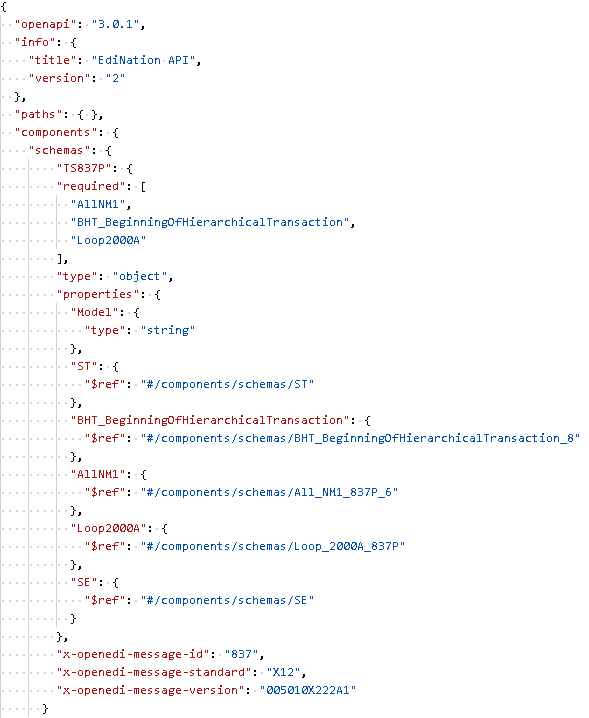
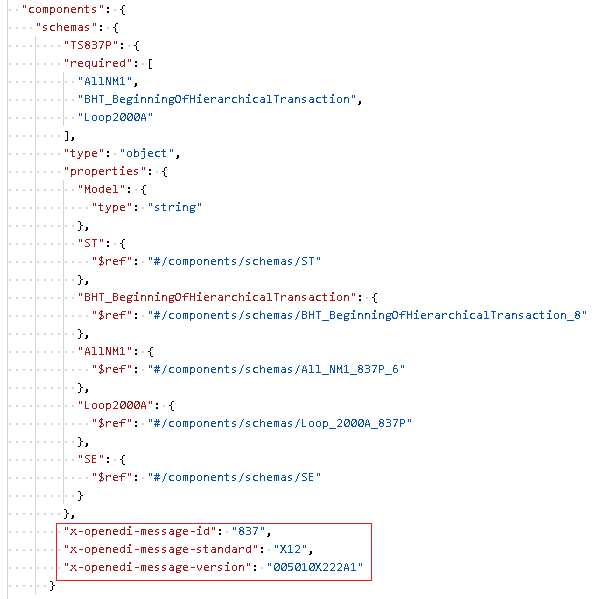
All EDI items such as message, loop, segment, or composite/data element must include their corresponding extension property:
-
x-openedi-message-id
The transaction set ID. Required for message objects.
-
x-openedi-message-standard
The transaction set standard, either X12 or EDIFACT. Required for message objects.
-
x-openedi-message-version
The transaction edition and release. Required for message objects only if multiple messages with the same transaction ID are included in the same definition.
-
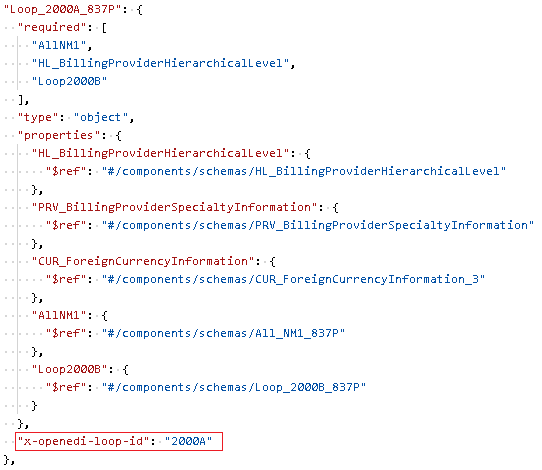
x-openedi-loop-id
The loop ID. Required for loop objects.
-
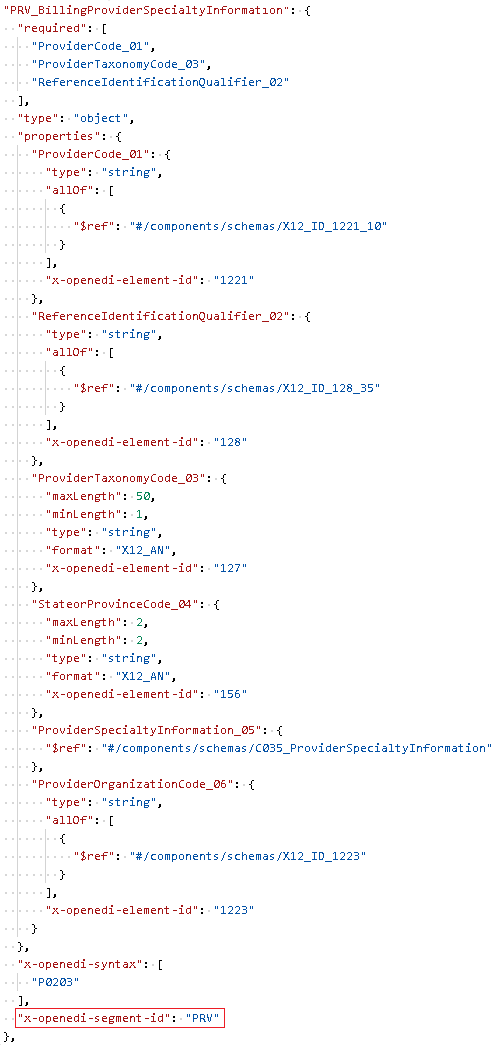
x-openedi-segment-id
The segment ID. Required for segment objects.
-
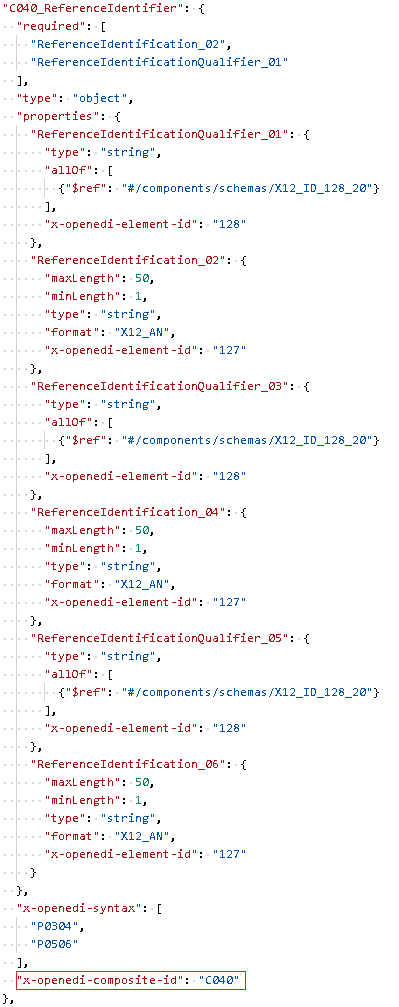
x-openedi-composite-id
The composite data element ID. Required for composite element objects.
-
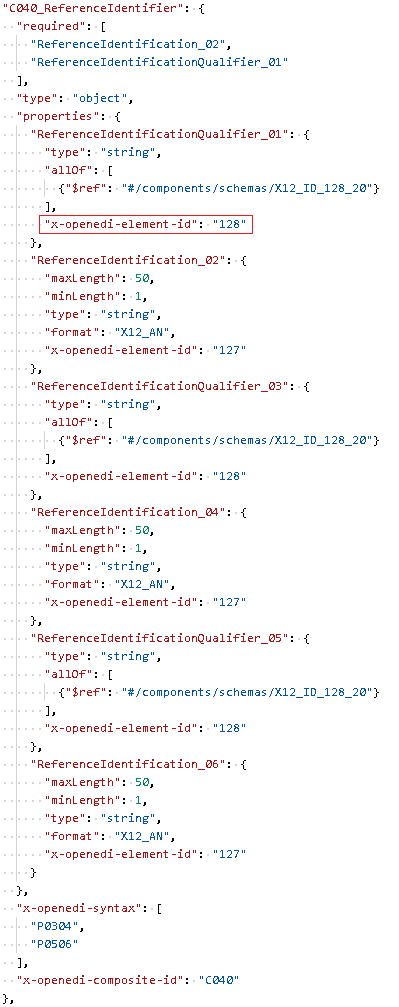
x-openedi-element-id
The simple data element ID. Required for simple element properties.
-
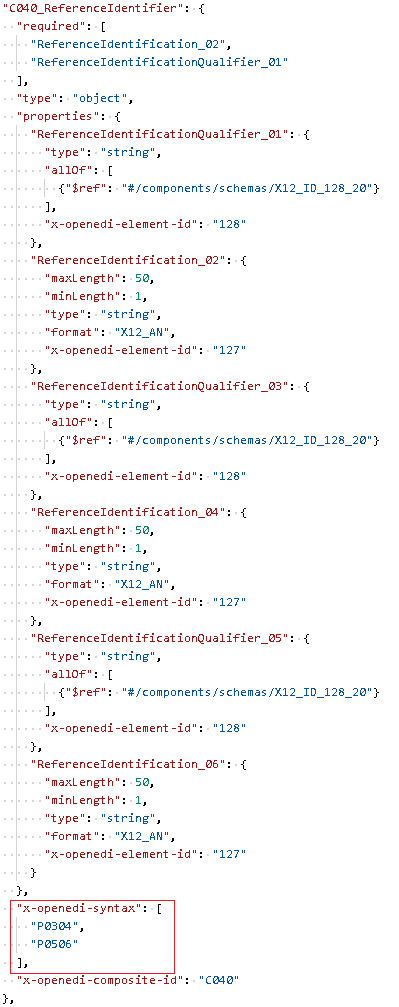
x-openedi-syntax
The array of syntax items for data element conditions. Optional for segments and composite elements.
The format of each array item must be:
{condition designator}{start position}[other positions]{end position}{start position},{end position}and all other positions in-between must be two-digit numeric values, 0 to 9 must be padded with a leading zero.{condition designator}must be one of the following values:- P- Paired
- R- Required
- E- Exclusion
- C- Conditional
- L- List Conditional
-
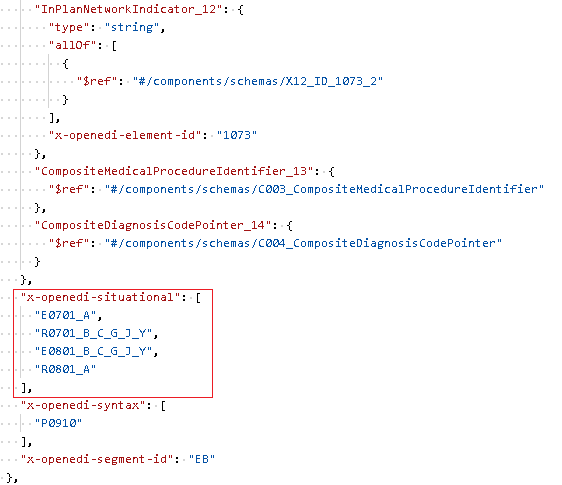
x-openedi-situational
The array of situational items for situational data element validation used in HIPAA 5010. Optional for segments and composite elements.
The format of each array item must be:
-
For [NotUsed]:
{condition designator}{start position}[other positions] -
For [RequiredIf] and [ExclusionIf]:
{condition designator}{start position}{end position}_{value1}[_{other values}]
{start position},{end position}and all other positions must be two-digit numeric values, 0 to 9 must be padded with a leading zero.{value1}, and all other values must be separated by _ (underscore).{condition designator}must be one of the following values:- R- Required If
- E- Exclusion If
- N- NotUsed
-
-
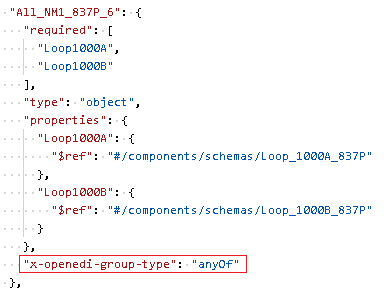
x-openedi-group-type
Use this for marking groups of segments or loops that can be repeated as a group and also:
-
Any segment or loop can appear in any order within the group:
x-openedi-group-type: anyOf -
Only one segment or loop can appear in the group:
x-openedi-group-type: oneOf -
All segments or loops must appear in the exact sequence:
x-openedi-group-type: seqOf
-
-
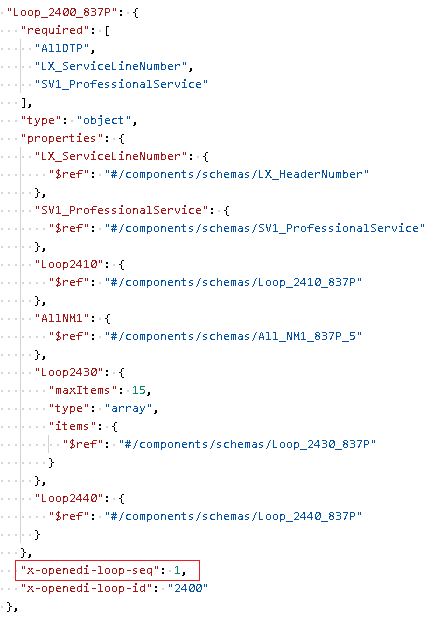
x-openedi-loop-seq
To denote the segment within a repeating loop, that needs to be checked for sequential numbers, such as LX:
OpenEDI message
Each EDI message, or transaction set, is identified by the following three values:
-
EDI Standard
This could be X12, EDIFACT, or other, denoting the particular EDI dialect. It is mandatory and allows transactions for different EDI standards to be batched together in the same OpenAPI definition.
Use the x-openedi-message-standard OpenAPI extension at the top level to set the standard.
-
EDI Version
This is the edition and release of the transaction set, for example, 004010 or D96A. It is optional given that no other transaction sets with the same ID will be used in the same OpenAPI definition, otherwise it is mandatory.
Use the x-openedi-message-version OpenAPI extension at the top level to set the version.
-
Transaction Set ID
This is the transaction set ID as specified by the standard, for example, 850 is the ID for a purchase order in the X12 standard and ORDERS is the ID for a purchase order in the EDIFACT standard. It is mandatory.
Use the x-openedi-message-id OpenAPI extension at the top level to set the ID.
EDI message structure
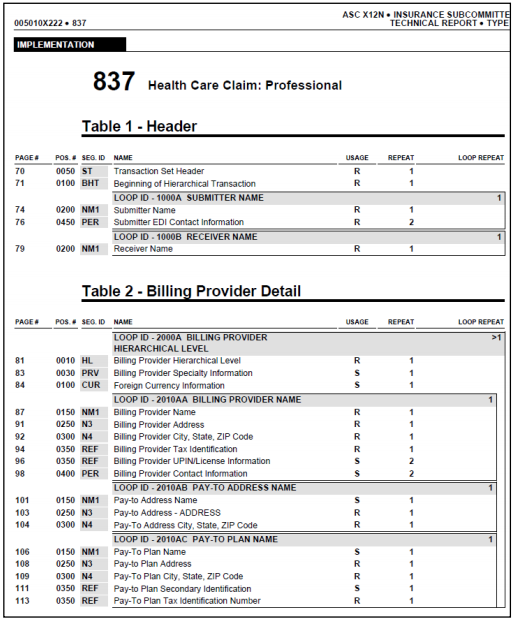
The structure of each transaction set is usually depicted in their implementation guidelines with schemas more or less similar to the one below:
The image is copyrighted by X12.org
The schema defines the positions (the order) of all segments and loops, their IDs (the EDI codes to identify each segment and loop), the usage (mandatory or not), and the repetitions in the same position. A description is also available for some or all segments/loops, but it is not essential.
The following concepts must be used to convert the depicted structure above into an OpenAPI Schema object:
-
Position
The position of the segments, loops and data elements is inferred from the order in the schema definition. The top item (ST) is in position 0, the next item (BHT) is in position 1, etc.
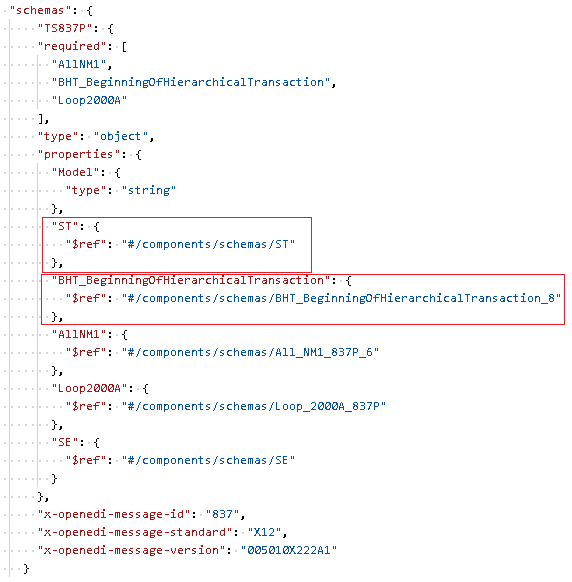
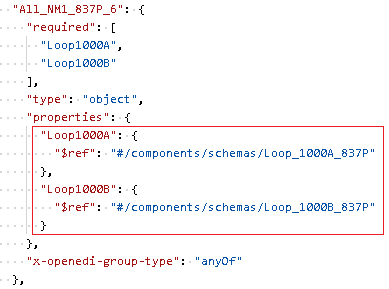
When the guideline shows two or more items to be in the same position like the two NM1 Loops above in position 0200, then a new object must be created to contain all the items in the same position.
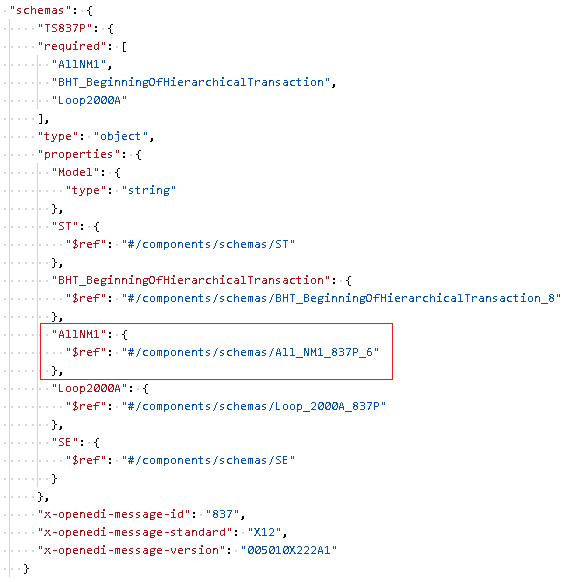
This new Schema object must be marked with the x-openedi-group-type extension property.
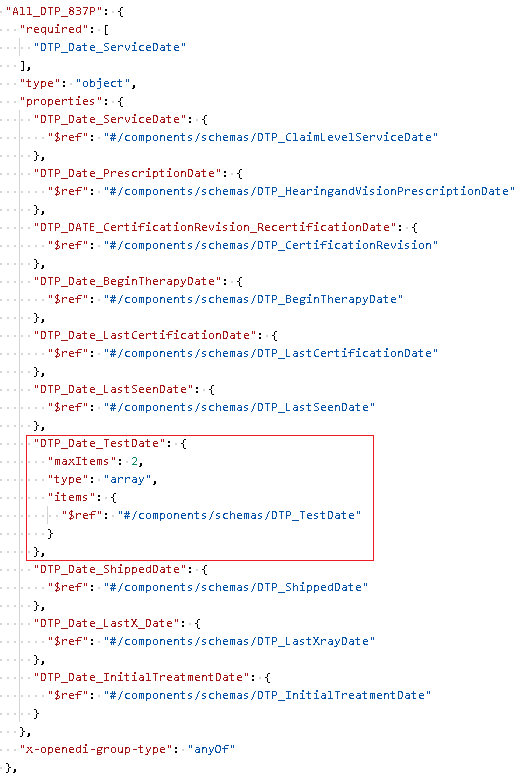
The items in the same position can be repeatable, though:
-
Usage
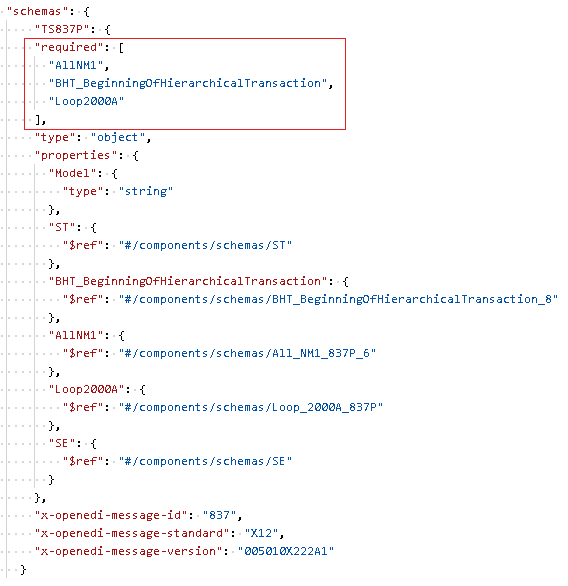
Use OpenAPI "required" attribute to mark all mandatory items. ST and SE segments don't need to be marked as required, the API internally marks them as required.
-
Repetitions
All non-repeatable items are defined as reference properties.
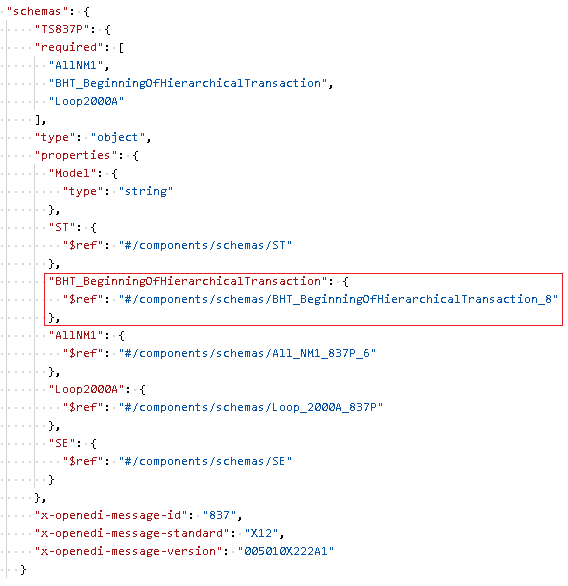
All repeatable items are defined as OpenAPI "array" where the item's type is a reference to the repeatable item.
Use OpenAPI "array," "minItems" and "maxItems" attributes to define the repetitions range.
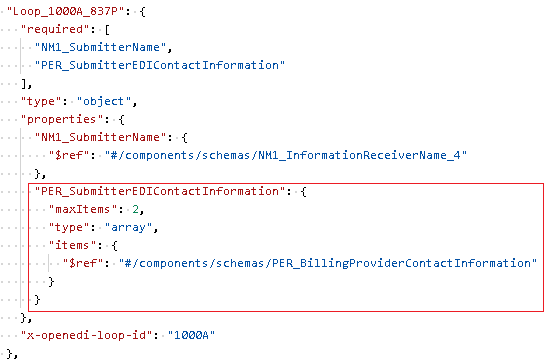
Use OpenAPI "description" attribute to pass in additional comments at each level of the EDI segment/composite element.
OpenEDI segment
Each EDI segment is identified by its ID. All the information below is also applicable to EDI composite data elements.
Use the x-openedi-segment-id OpenAPI extension to set the segment ID.
Use the x-openedi-composite-id OpenAPI extension to set the composite data element ID.
EDI segment structure
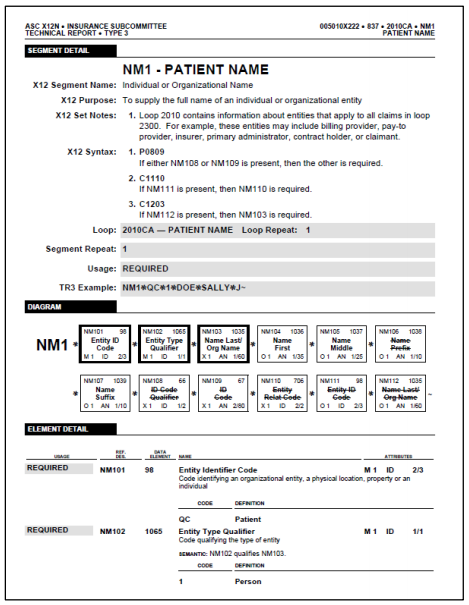
The structure of each segment/composite element is usually depicted in their implementation guidelines with schemas more or less similar to the one below:
The image is copyrighted by X12.org
The schema defines the positions (the order) of all data elements, their IDs (the EDI codes to identify each composite or simple data element), the usage (mandatory or not), and the repetitions in the same position. Additionally, every simple data element has a data type and minimum/maximum length. A description is also available for some or all data elements, but it is not essential.
The following concepts must be used to convert the depicted structure above into an OpenAPI Schema object:
-
Position
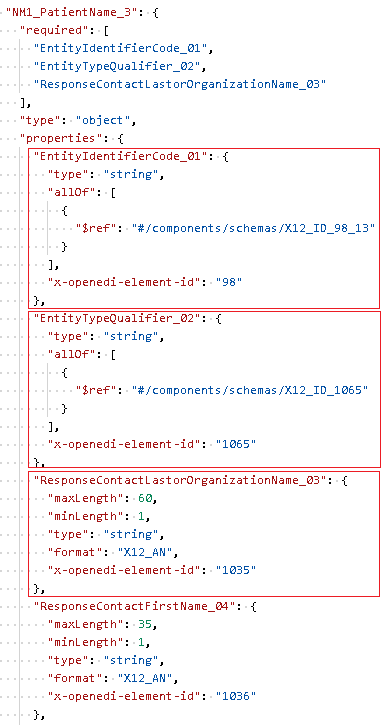
The position of the data elements is inferred from the order in the schema definition. The top item (NM101) is in position 0, the next item (NM102) is in position 1, etc.
-
Usage
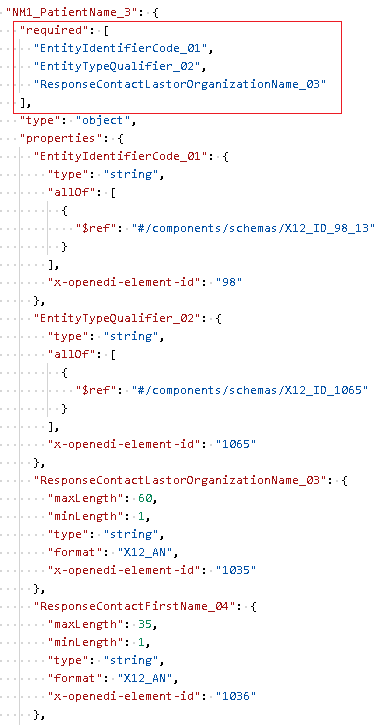
Use OpenAPI "required" attribute to mark all mandatory items.
-
Repetitions
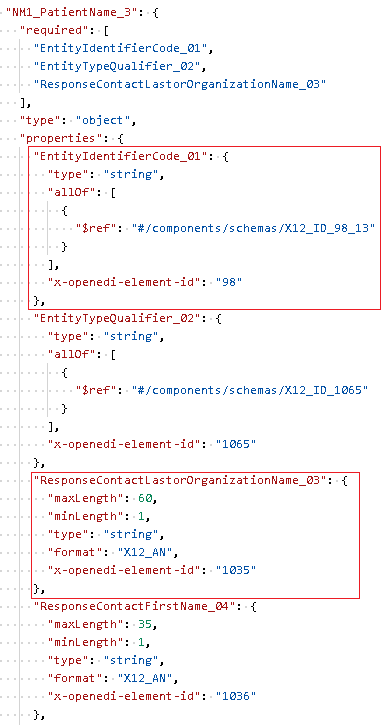
All non-repeatable items are defined as properties of type "string" for simple data elements:
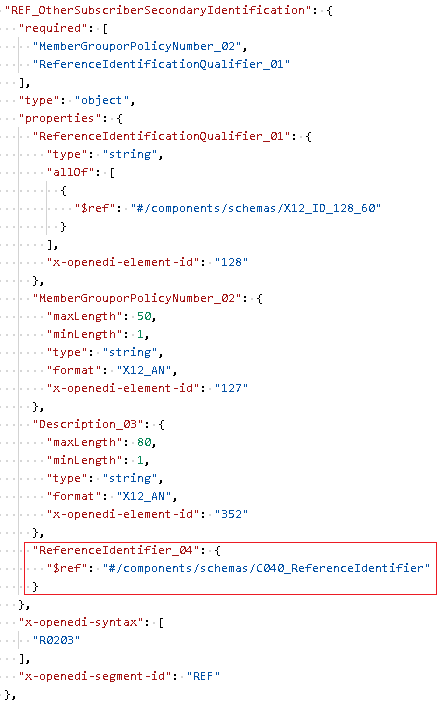
and a Reference object for composite types:
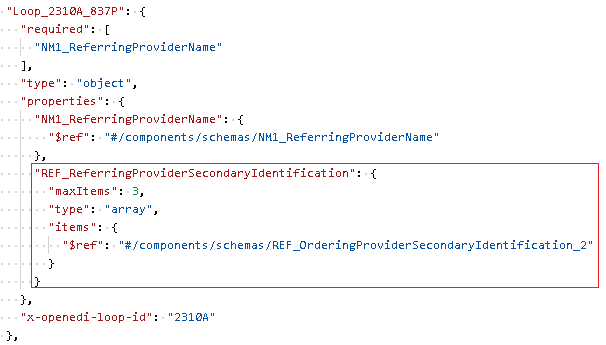
All repeatable items are defined as OpenAPI "array" where the item's type is "string" for simple data elements and a Reference object for composite elements.
Use OpenAPI "array" "minItems" and "maxItems" attributes to define the repetitions range.
Use OpenAPI "description" attribute to pass in additional comments at each level of the EDI segment/composite element.
OpenEDI data element
Each EDI simple data element is identified by its ID.
Use the x-openedi-element-id OpenAPI extension to set the data element ID.
EDI data element structure
The structure of each data element is usually depicted in their implementation guidelines with schemas more or less similar to the one below:
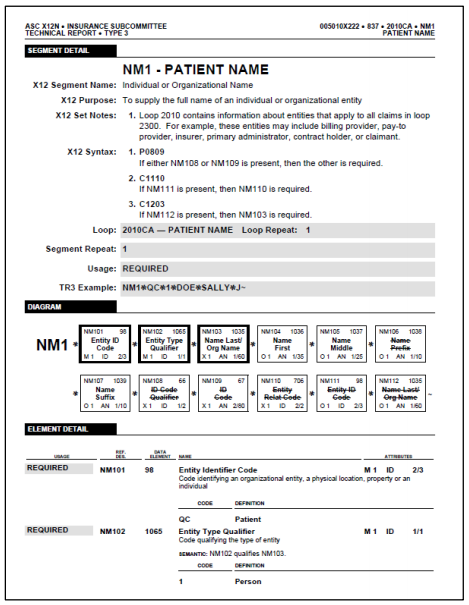
The image is copyrighted by X12.org
The schema defines the data type, EDI Code, and minimum/maximum length. A description is also available for some or all data elements, but it is not essential.
Note
All values in the OpenAPI "format" attribute and in the "enum" object are case sensitive and must be set exactly as prescribed by the implementation guide or set out below.
The following concepts must be used to convert the depicted structure above into properties of OpenAPI objects:
-
Data Type (not EDI Code)
When the data type is not EDI Code (not marked as "ID" in the guideline), you can use the following values to set the data type in the OpenAPI "formats" attribute:
X12
- X12_AN - X12 alphanumeric
- X12_NX - X12 numeric with implied decimal, X can be any between 0 and 7
- X12_DT - X12 date
- X12_TM - X12 time
- X12_R - X12 decimal
EDIFACT
- EDIFACT_AN - EDIFACT alphanumeric
- EDIFACT_A - EDIFACT alphabetic
- EDIFACT_N - EDIFACT numeric
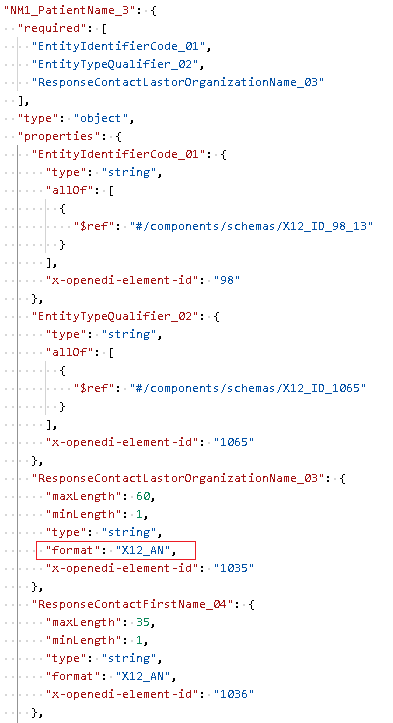
-
Data Type (EDI Code)
EDI Codes are represented as OpenAPI "enum" objects of type string. Data elements with EDI Code type are represented as a property of type "string" with a Reference object to the underlying EDI Code type, wrapped up in OpenAPI "allOf":
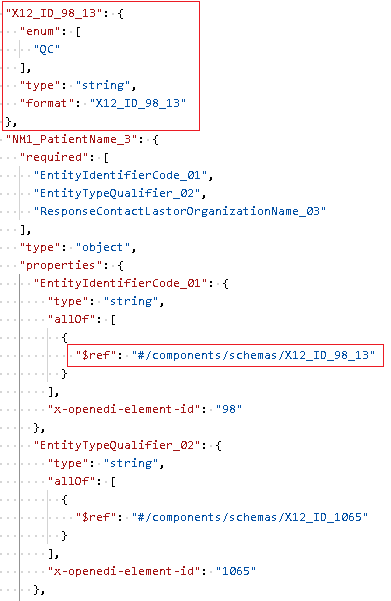
-
Minimum/maximum length
Use OpenAPI "minLength" and "maxLength" attributes:
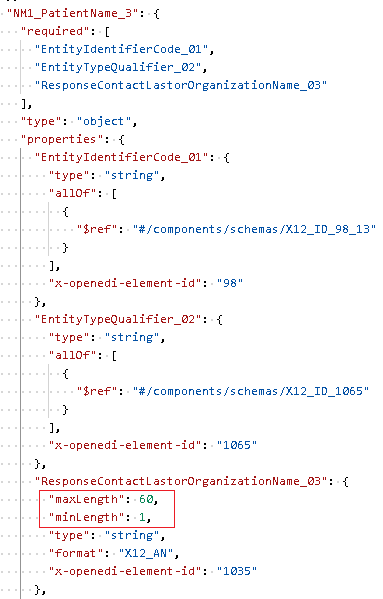
OpenEDI models
EdiNation provides a vast and always-expanding library of EDI models. These are referred to as System models and are available to all API consumers.
System models are available for the following EDI standards: