
EDI models Last updated: 2026-10-08
ediFabric Native loads a model with set_map. The file that call reads is an intermediary JSON download. You author the model as OpenEDI, the same schema Cloud uses, and you download the intermediary when the schema is ready. How OpenEDI, the intermediary, and the .NET C# template relate is in EDI models. The Python below is from the ediFabric Python bindings: README, example_all_functions.py, and map/map.json.
The model files and the map JSON are the same in every binding. Pass the map to setMap in Java and Node.js, SetMap in Go and C#, ef::set_map in Rust, or ef_set_map in C. Each repository ships the same map folder with the 837P and 834 models.
Represent models as OpenEDI
A Native model is an OpenEDI schema. OpenEDI is an OpenAPI document: the message, its loops and segments, and each element's id, length, and codes. HIPAA 837P is model EdiNation.X12.HIPAA.005010, message 837P, version 005010X222A1. The same message in OpenEDI, next to the C# template .NET uses, is in EDI models. The keywords are in OpenEDI format.
A partner change is an edit to that schema: a code set, a required element, a repeat, or an extra element. Keep the baseline schema, and put the partner copy beside it. The application still does not hand the OpenEDI file to the engine. After the edit, download the intermediary and point set_map at that file.
Download the intermediary
Every plan, Community or paid, uses the same models. Standard models come from the EDI spec library. Open 837P. On the ediFabric Native tab, select Download Native:
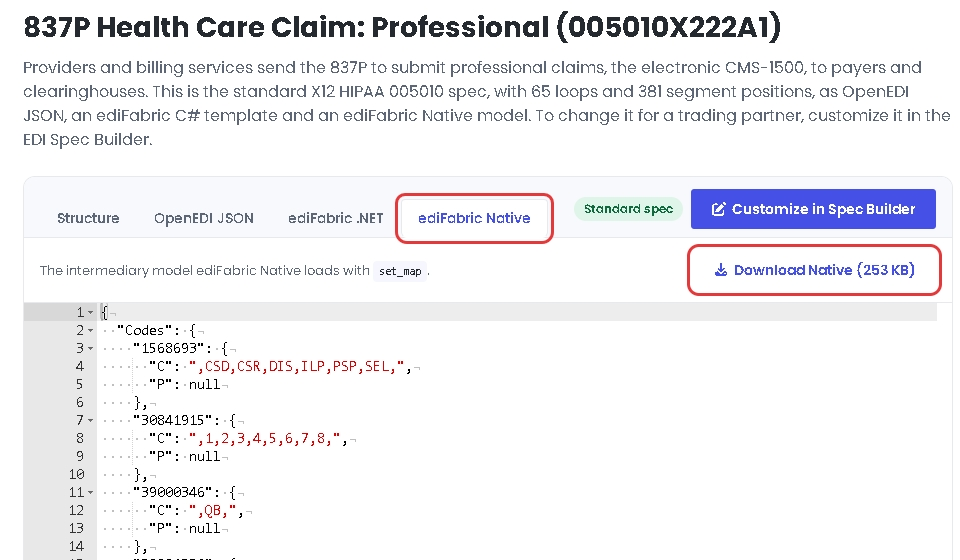
Save that file where the map can name it. The Python example calls the 837P file model837P.json and keeps it in the map folder next to map.json.
The intermediary is the layout the engine loads. The message entry records the model, the transaction, and the version. The map key is message:version, so this 837P is 837:005010X222A1.
{
  "Messages": {
    "837P_EdiNation.X12.HIPAA.005010": {
      "Format": "X12",
      "Model": "EdiNation.X12.HIPAA.005010",
      "Type": "837P",
      "Version": "005010X222A1"
    }
  }
}
Customize a model
A custom model is built in the EDI spec builder. Edit the OpenEDI schema there, or import an OpenEDI file. When the schema matches the partner guide, select Update. Then, on the ediFabric Native tab, select Download Native. That file is the intermediary for set_map.
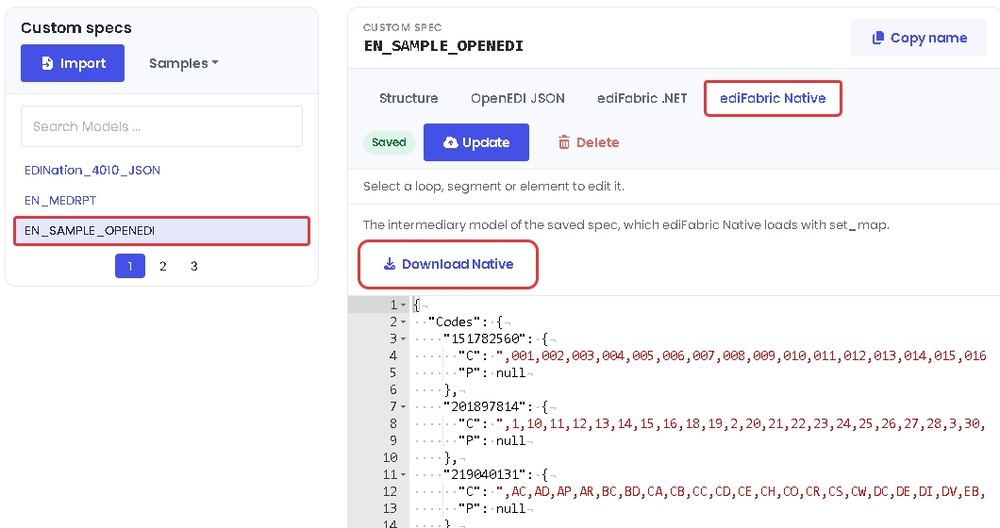
What to change in the schema, and how that lines up with a C# template, is in Change the OpenEDI schema. Element ids, lengths, and codes are in OpenEDI format.
Why the intermediary is not OpenEDI
The application does not author the intermediary. It is a download for set_map. OpenEDI is the authoring form for Native and for Cloud. C# templates are the .NET form. EDI models is that split, including why a class generated from OpenEDI is for your code and is still not the file the engine loads.
set_map reads the intermediary because that JSON is already the compiled layout: messages, segments, groups, elements, composites, codes, and rules. Native does not compile the OpenEDI schema when it loads a model. Compiling it on every process start is the work the download skips, which is what keeps parse fast.
Local models in set_map
set_map loads one map for the process. Call it once, after set_serial and before parse. In edifabric_x12.py the argument is the map JSON. A key is message:version. type 1 is a local file: location is the folder and name is the file. map/map.json in the Python bindings:
{
  "default": "",
  "maps": {
    "837:005010X222A1": {
      "type": 1,
      "name": "model837P.json",
      "location": "map"
    },
    "834:005010X220A1": {
      "type": 1,
      "name": "model834.json",
      "location": "map"
    }
  }
}
Leave default null when the transaction is already in maps. The file above uses an empty string for the same case: 837P and 834 are on disk, so nothing falls back to the online map. The README accepts either null or "".
import json
from pathlib import Path

import edifabric_x12 as ef

map_path = Path("map") / "map.json"
local_map = json.loads(map_path.read_text(encoding="utf-8"))

ef.load_library()
ef.set_serial(serial)
ef.set_map(json.dumps(local_map))
serial is the key from Your account. parse then returns a UTF-8 string and an offset. In edifabric_x12.py the binding decodes the buffer before it returns, so the slice is already a string.
edi = (Path("edi") / "837p.txt").read_text(encoding="utf-8")
output, offset = ef.parse(edi, ef.ParseMode.JSON)
print(output)
Build map locations dynamically
The location in map.json is a placeholder. load_local_map in example_all_functions.py rewrites every entry to the folder that actually holds the JSON, so the same map works from any working directory. demo_set_local_map passes that dict to set_map.
MAP_PATH = Path(__file__).resolve().parent / "map" / "map.json"

def load_local_map() -> dict:
    """Load MAP/Map.json and point each entry at the local MAP folder."""
    model_map = json.loads(MAP_PATH.read_text(encoding="utf-8"))
    map_dir = str(MAP_PATH.parent.resolve())
    for entry in model_map.get("maps", {}).values():
        entry["location"] = map_dir
    return model_map

ef.set_map(json.dumps(load_local_map()))
Default map with the serial key only
Set default to the serial key when a transaction should fall back to the online map. With no local files, maps is empty. This is the online map in the README:
ef.set_map(json.dumps({"default": serial, "maps": {}}))To keep the local files and still fall back, load_online_map reads map.json and sets default to the serial. A key that is already in maps uses the local intermediary. Any other transaction uses the online map. demo_set_online_map is that call.
model_map = json.loads(MAP_PATH.read_text(encoding="utf-8"))
model_map["default"] = serial
ef.set_map(json.dumps(model_map))
Reading and writing the transaction JSON, once the map is loaded, is Convert between EDI and JSON.