
Licensing Last updated: 2026-11-10
Every ediFabric .NET call needs a serial key from your plan. Copy it from Your account after you sign up for Community or buy a plan. The same serial covers ediFabric .NET, Native, and Cloud. To evaluate without an account, use the demo serial key bd96a836feca45cb91c86ee65d281f52, which works for all three products and has a limited quota.
The examples come with the demo serial key in TrialSerialKey in Config.cs. When its quota runs out, paste your own serial there. For X12 that file is NET Framework 4.8/EdiFabric.Examples.X12.Common/Config.cs. The .NET 6 projects link it, so one edit covers both solutions.
Note
This article is for all EdiFabric versions >= 11.0.0. For older versions use EdiFabric.SerialKey.Set("Valid serial key"), or var token = EdiFabric.SerialKey.GetToken("Valid serial key"); // Save the token to cache ... // Retrieve the token from cache EdiFabric.SerialKey.SetToken("Valid token") instead.
Which call to use
Call one of these before you parse, generate, validate, or acknowledge. From ediFabric .NET 11.2.0, call License.EnsureToken on every plan. The examples call License.EnsureToken(Config.TrialSerialKey, 3600). License.SetSerial still works.
| Plan | What works | Call this |
|---|---|---|
| Community |
License.EnsureToken or License.SetSerial. Online check on each operation. 250 operations per day. Non-production. Never expires. |
License.EnsureToken |
| Developer |
License.EnsureToken. It gets a token bound to this machine, which lasts about a day, and caches it on disk, so a restart reuses it. License.SetSerial also works. |
License.EnsureToken |
| Enterprise |
License.EnsureToken, or License.GetToken and License.SetToken. EnsureToken gets a self-service offline token, which lasts 30 days, caches it on disk, and refreshes it before it expires. Perpetual uses the same calls. A 1-year token (Enterprise) or a 5-year token (Perpetual) is available on request. |
License.EnsureToken, or License.SetToken on air-gapped hosts |
// Every plan, from 11.2.0: gets, caches and refreshes the license; refreshes a token that expires within N seconds
License.EnsureToken(serial, seconds: 3600);

// Community: also works, an online check on each operation
License.SetSerial(serial);

// Enterprise and Perpetual: apply a token you store yourself, such as a long-lived token
License.SetToken(token);
One operation is one parse, generate, validate, or acknowledge call. The Community quota of 250 a day is shared across ediFabric .NET, Native, and Cloud. Past that, calls throw
LicenseExceptionwith error 639.Use of the product is subject to the EULA. Upgrading is a serial-key swap. With
License.EnsureToken, there is nothing else to change.
Daily quota: 10,000 license calls
Developer and Enterprise allow up to 10,000 calls to the license server per day, shared across ediFabric .NET and Native. Every call that contacts the license server counts, including License.SetSerial, License.EnsureToken when it refreshes, and License.GetToken. Use License.EnsureToken on Developer and an offline token on Enterprise, so that your processes make as few license calls as possible.
Enterprise offline tokens are available during the trial with a 1-day token lifetime, which changes to 30 days after purchase.
The token cache
License.EnsureToken keeps the token it gets in a cache on the machine, so the next process, or the same one after a restart, reuses it instead of contacting the license server. On Community there is no token: it checks online on each operation and caches nothing. The cache is shared by ediFabric .NET and ediFabric Native on the same machine, and its files are readable only by your user account:
- Windows:
%LOCALAPPDATA%\EdiFabric\tokens - Linux:
~/.cache/edifabric/tokens, or$XDG_CACHE_HOME/edifabric/tokenswhen it is set - macOS:
~/Library/Caches/EdiFabric/tokens
Set the environment variable EDIFABRIC_TOKEN_CACHE to another folder before the process starts, or to none to turn the cache off. If the license server can't be reached, License.EnsureToken keeps using a valid cached token and tries again at most every 5 minutes. With no cached token, it throws LicenseException with error 640.
Developer: let EnsureToken cache the check
License.EnsureToken gets a token bound to this machine, which lasts about a day, and keeps it in the token cache, so a restart doesn't contact the license server again. Pass seconds to refresh early, before the token expires. A later network blip or a long batch keeps running on that token.
License.GetToken is not available on Developer. Calling it throws LicenseException with error 628. Use EnsureToken.
A seat is one environment: Community leases 3, Developer leases 3, Enterprise is unlimited.
Enterprise and Perpetual: run without internet
Once an offline token is set, by License.EnsureToken or License.SetToken, translation does not contact EdiFabric, and the EDI file is never part of a license call. There are two ways to get a token:
| Option 1: self-service 30-day token | Option 2: long-lived token | |
|---|---|---|
| Best for | Hosts where one machine can reach the internet | Air-gapped hosts, or when you don't want a refresh job |
| How you get it | License.EnsureToken in each process, or License.GetToken from a scheduled job | Signed request form, after the trial or evaluation period |
| Lifetime | 30 days | 1 year on Enterprise, 5 years on Perpetual |
| Availability | Immediately after purchase | Registered companies with professional email addresses. Non-refundable once issued |
Option 1: self-service 30-day token
Retrieve the token on a machine that can reach the license server, store it, and apply it where the EDI runs.
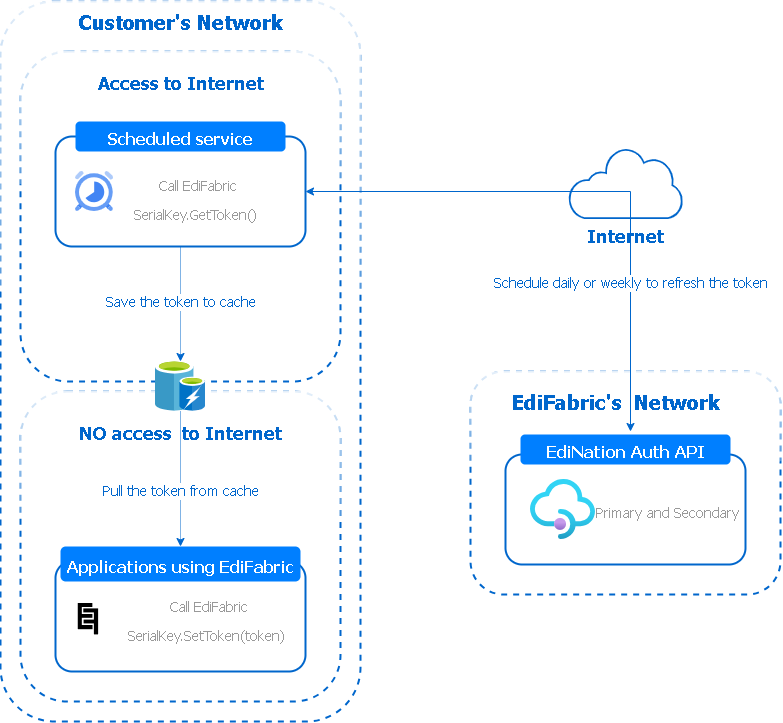
- A small scheduled job on a machine with internet access calls
License.GetToken(serial), for example once a day or once a week, well before the token expires. - It saves the token somewhere all interfaces can read, such as a file share, a database table, Redis or a key vault.
- Each interface reads the current token when it starts and calls
License.SetToken(token). No license call is made after that.
// Host with internet
var token = License.GetToken(serial);
// Save token to your cache

// Offline host
var token = cache.Get();
License.SetToken(token);
TokenFileCache.Set() in EdiFabric.Examples.X12.Common is a file-cache sample of that GetToken / SetToken pair. TokenFileCache.cs. Refresh before the token expires so a missed job does not stop processing. If GetToken fails repeatedly, contact support or support@edifabric.com.
Option 2: long-lived token
Use this for air-gapped hosts, or if you don't want to run a refresh job. Enterprise gets a 1-year token that runs to the end of your annual term plus 30 days. Perpetual gets a 5-year token that covers the versions released up to the end of your updates or maintenance, replaced free of charge before it expires. Long-lived tokens work with ediFabric .NET 11.2.0, ediFabric Native 1.2.0 and later. Apply it with License.SetToken in the same way.
- Long-lived tokens are issued after the 14-day Enterprise trial, or 14 days after a Perpetual purchase, and once payment has cleared. They are non-refundable once issued.
- Only registered legal entities can request one, using a signed request form and professional email addresses. Public and disposable email addresses are declined. How to request a token.
- If you have internet access on one machine, Option 1 keeps you running until your long-lived token arrives.
Store every token as a secret, and tell us within 2 business days if one is exposed. What happens if a token leaks.
What leaves your network
-
Community.
License.EnsureTokenchecks the serial with the license server when you translate. -
Developer, Enterprise and Perpetual.
License.EnsureTokenchecks only when the cached token is missing or inside the refresh window you set. -
Enterprise and Perpetual.
License.GetTokenchecks when you mint a token.License.SetTokenapplies a token you already have and does not call out.
Parse, generate, validate, and acknowledge run in your process. See the privacy policy.
When a license call fails
Failures throw LicenseException. ErrorCode is the number, and Message is the text.
Error 635 means no serial or token was set. Paste the serial into TrialSerialKey and call License.EnsureToken. Error 639 means the Community daily quota was exceeded. Upgrade at edifabric.com/pricing to continue.
| Code | Message |
|---|---|
| 620 | The token is invalid. Contact support@edifabric.com for assistance |
| 628 | The serial number is missing or incorrect. GetToken doesn't work with developer license. Contact support@edifabric.com for assistance |
| 629 | License was not installed. Contact support@edifabric.com for assistance |
| 630 | No license to use this version: it was released after the end of your maintenance, or after your plan's maximum version. Contact support@edifabric.com for assistance |
| 631 | The token has expired. Get and set a new token to continue. Contact support@edifabric.com for assistance |
| 632 | The token is missing. Set token to continue. Contact support@edifabric.com for assistance |
| 633 | Reached the maximum number of licenses. Set token to continue. Contact support@edifabric.com for assistance |
| 634 | Environment not recognized for licensing or reached the maximum number of licenses. Contact support@edifabric.com for assistance |
| 635 | Serial or token not found. Either set token or serial to continue. Contact support@edifabric.com for assistance |
| 638 | The operation is not supported by your license |
| 639 | Your license has reached its daily call limit. Upgrade your plan at edifabric.com to continue using the product. |
| 640 | The license server can't be reached and no valid token is cached. Check the internet connection, firewall and proxy settings, and try again. |
Use the same EdiFabric 11 package in every project. Parser and buffer codes are listed in the X12 README.
What to do if there is no access to the Authentication API
Confirm that external calls to the Authentication API are not blocked from your environment. License.EnsureToken needs that path on every plan: on Community for each operation, and on the other plans to get and refresh tokens. Enterprise hosts that already have a token only need License.SetToken, which does not call out.
If you are setting firewall rules, allow the Authentication API:
Primary
- Host: api.edination.com
- IP: 104.211.12.89
- Port: 443
Secondary
- Host: api.edifabric.com
- IP: floating
The Authentication API runs on more than one server, shared between Microsoft Azure and Amazon AWS. EdiFabric calls the Azure endpoint first when it acquires a token. If that endpoint does not respond after the configured timeout and retries, it calls the backup endpoint on AWS.
If both endpoints are down, or no token can be acquired at all, contact support or support@edifabric.com. We will send a temporary token. Install it on your servers as an environment variable or pass it to License.SetToken. EdiFabric then runs offline until connectivity to the Authentication API is restored.
License.SetToken(temporaryToken);We also publish the temporary token on our X. Contacting us there is useful during an outage.
Links
- Licensing in the X12 examples
- Plans
- Your account
- Install EdiFabric
- Support or support@edifabric.com