
Build EDI files Last updated: 2024-08-23
Generating EDI files with EDI Writer
Generating an EDI file with ediFabric .NET is a three-step process:
- Create an instance of the required EDI template (or C# class), e.g. TS837P for a medical claim or TSINVOIC for an invoice.
- Populate that instance with data, usually, this requires custom code to convert either a database/domain object or export from an ERP in CSV, XML, JSON, etc. format, to the EDI template.
- Write the instance to an EDI file or a stream using EDI writer.
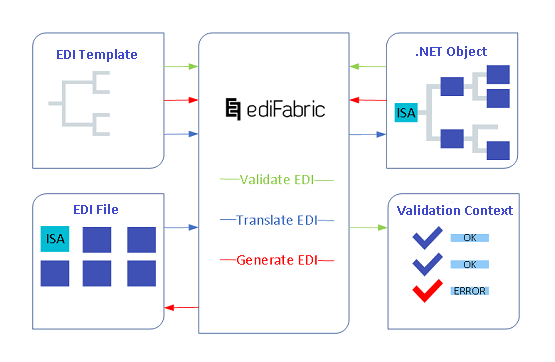
The red path below depicts the generation of an EDI file:
- A .NET object (instance of its EDI template)
- Is processed through an EDI writer (EdiFabric)
- To produce an EDI file
How to create and populate .NET objects
When you need to generate, let's say an invoice in the X12 standard, you'll need to create an instance of the EDI template, that represents an invoice according to the X12 standard.
Once the instance is available, you can begin populating it with custom code, which maps your internal objects or database export, to the structure of the EDI template.
X12
var result = new TS810();

result.ST = new ST();
result.ST.TransactionSetIdentifierCode_01 = "810";
result.ST.TransactionSetControlNumber_02 = controlNumber.PadLeft(9, '0');

result.BIG = new BIG();
result.BIG.Date_01 = "20000513";
result.BIG.InvoiceNumber_02 = "SG427254";
result.BIG.Date_03 = "20000506";
result.BIG.PurchaseOrderNumber_04 = "508517";
result.BIG.ReleaseNumber_05 = "1001";
EDIFACT
var result = new TSINVOIC();

result.UNH = new UNH();
result.UNH.MessageReferenceNumber_01 = controlNumber.PadLeft(14, '0');
result.UNH.MessageIdentifier_02 = new S009();
result.UNH.MessageIdentifier_02.MessageType_01 = "INVOIC";
result.UNH.MessageIdentifier_02.MessageVersionNumber_02 = "D";
result.UNH.MessageIdentifier_02.MessageReleaseNumber_03 = "96A";
result.UNH.MessageIdentifier_02.ControllingAgencyCoded_04 = "UN";

result.BGM = new BGM();
result.BGM.DOCUMENTMESSAGENAME_01 = new C002();
result.BGM.DOCUMENTMESSAGENAME_01.Documentmessagenamecoded_01 = "380";
result.BGM.Documentmessagenumber_02 = "IN432097";
HL7
var result = new TSRDSO13();

result.MSH = new MSH();

result.MSH.SendingApplication_02 = new SendingApplication();
result.MSH.SendingApplication_02.NamespaceID_01 = senderId;
result.MSH.SendingFacility_03 = new SendingFacility();
result.MSH.SendingFacility_03.NamespaceID_01 = senderFacility;
result.MSH.ReceivingApplication_04 = new ReceivingApplication();
result.MSH.ReceivingApplication_04.NamespaceID_01 = receiverId;
result.MSH.ReceivingFacility_05 = new ReceivingFacility();
result.MSH.ReceivingFacility_05.NamespaceID_01 = receiverFacility;
result.MSH.DateTimeOfMessage_06 = DateTime.Now.Date.ToString("yyyyMMdd") + DateTime.Now.TimeOfDay.ToString("hhmm");
result.MSH.MessageType_08 = new MessageType();
result.MSH.MessageType_08.MessageCode_01 = "RDS";
result.MSH.MessageType_08.TriggerEvent_02 = "O13";
result.MSH.MessageType_08.MessageStructure_03 = "RDS_O13";
result.MSH.MessageControlID_9 = controlNr;
result.MSH.ProcessingID_10 = new ProcessingID();
result.MSH.ProcessingID_10.ProcessingID_01 = "P";
result.MSH.VersionID_11 = new VersionID();
result.MSH.VersionID_11.VersionID_01 = "2.6";

result.LoopPID = new Loop_PID_TSRDSO13();
result.LoopPID.PID = new PID();
result.LoopPID.PID.PatientID_02 = new ExtendedCompositeIDWithCheckDigit();
result.LoopPID.PID.PatientID_02.IDNumber_01 = "0008064993";
result.LoopPID.PID.PatientID_02.AssigningAuthority_04 = new ExtendedAssigningAuthority();
result.LoopPID.PID.PatientID_02.AssigningAuthority_04.ExtendedAssigningAuthority01 = "ENT";
result.LoopPID.PID.PatientID_02.IdentifierTypeCode_05 = "PE";
result.LoopPID.PID.PatientID_02.EffectiveDate_07 = "20030806";
result.LoopPID.PID.PatientID_02.ExpirationDate_08 = "200507";
NCPDP
var result = new TSB1();

result.G1 = new TransactionHeader();
result.G1.TransactionReferenceNumber_1 = tranRefNumber;
result.G1.BINNumber_2 = binNumber;
result.G1.VersionReleaseNumber_3 = "D0";
result.G1.TransactionCode_4 = "B1";
result.G1.ProcessorControlNumber_5 = processorNumber;
result.G1.TransactionCount_6 = "1";
result.G1.ReversalRequest_7 = reversalReq;
result.G1.BillingRequest_8 = billingReq;
result.G1.PredeterminationofBenefitsRequest_9 = preReq;
result.G1.SoftwareVendorCertificationID_10 = "";

result.AM04Loop = new Loop_AM04_TSB1();
result.AM04Loop.AM04 = new AM04();
result.AM04Loop.AM04.CardholderID_C2 = "DK86342S";
result.AM04Loop.AM04.EligibilityClarificationCode_C9 = "0";
result.AM04Loop.AM04.PersonCode_C3 = "001";
SCRIPT
var result = new TSNEWRX();

result.UIH = new UIH();
result.UIH.MESSAGEIDENTIFIER_01 = new S306();
result.UIH.MESSAGEIDENTIFIER_01.MessageType_01 = "SCRIPT";
result.UIH.MESSAGEIDENTIFIER_01.MessageVersionNumber_02 = "010";
result.UIH.MESSAGEIDENTIFIER_01.MessageReleaseNumber_03 = "006";
result.UIH.MESSAGEIDENTIFIER_01.MessageFunction_04 = "NEWRX";
result.UIH.MessageReferenceNumber_02 = tranRefNumber;
result.UIH.DATEANDTIME_05 = new S300();
result.UIH.DATEANDTIME_05.Date_01 = "19971001";
result.UIH.DATEANDTIME_05.Time_02 = "081322";
VDA
var result = new TS4905();

result.S511 = new S511();
result.S511.RecordType_01 = "511";
result.S511.Version_02 = "02";
result.S511.CustomerCode_03 = "59012";
result.S511.SupplierCode_04 = "00323625";
result.S511.TransmissionNumberOld_05 = oldNumber.ToString();
result.S511.TransmissionNumberNew_06 = newNumber.ToString();
result.S511.TransmissionDate_07 = "121115";
result.S511.StartingDate_08 = "111231";
There are multiple approaches on how to convert or map between objects in .NET, however, this is not the premise of this article. To be able to properly construct a .NET object, sufficient knowledge is need for:
- The source of the data (database, CSV file, service model, XML, JSON, etc.)
- The destination EDI template, which matches the implementation guideline
- How to map the source to the destination, using custom .NET mapping code, or JSON/XML serialization
Concrete examples of creating EDI .NET objects:
It is also possible to map the internal structure to the JSON or XML representation of a particular EDI template, and then simply use the available tooling in .NET to deserialize it into a POCO.
Note
For mapping ideas, take a look at how XSLT and Automapper can transform .NET objects: X12 mapping examples, EDIFACT mapping examples.
How to write EDI objects
The purpose of an EDI writer is to write an already populated C# instance of a particular EDI template, to a text EDI file or stream. The writer is a simple extension of the .NET's StreamWriter, which caters to a few extra EDI-related things such as:
- To convert instances of EDI templates to text layout as expected by the EDI standard.
- To automatically apply the correct message, group, and interchange trailers. This counts the number of included segments, messages, and groups and matches control numbers.
- To apply the correct EDI separators.
- To apply segment postfixes if any.
- To apply control segments, such as ISA, UNB, MSH, etc.
All Edi writers provide a fast, non-cached, forward-only way to generate streams or files that contain EDI data. It is up to the consumer to preserve the sequence of what is being written.
Note
There is no need to write any of the EDI trailers because they are set automatically.
All writers implement IDisposable and need to be disposed of. This ensures that all buffered data is properly written and the internal buffer is cleared.
X12
using (var stream = new MemoryStream())
{
   using(var writer = new X12Writer(stream))
   {
       writer.Write(SegmentBuilders.BuildIsa("1"));
       writer.Write(SegmentBuilders.BuildGs("1"));

       //  1.  Write the first invoice
       writer.Write(SegmentBuilders.BuildInvoice("1"));

       //  2.  Write the second invoice
       writer.Write(SegmentBuilders.BuildInvoice("2"));
   }
}
EDIFACT
using (var stream = new MemoryStream())
{
   using(var writer = new EdifactWriter(stream))
   {
       writer.Write(SegmentBuilders.BuildUnb("1"));

       //  1.  Write the first invoice
       writer.Write(SegmentBuilders.BuildInvoice("1"));

       //  2.  Write the second invoice
       writer.Write(SegmentBuilders.BuildInvoice("2"));
   }
}
HL7
using (var writer = new Hl7Writer(stream))
{
    //  Envelope
    writer.Write(SegmentBuilders.BuildFhs("LAB1", "LAB", "DEST2", "DEST", "TESTFILE", "1234"));
    writer.Write(SegmentBuilders.BuildBhs("LAB1", "LAB", "DEST2", "DEST", "TESTBATCH", "1234"));

    //  Write the first dispense
    writer.Write(SegmentBuilders.BuildDispense("LAB1", "LAB", "DEST2", "DEST", "1"));
    //  Write the second dispense
    writer.Write(SegmentBuilders.BuildDispense("LAB1", "LAB", "DEST2", "DEST", "2"));
}
NCPDP
using (var writer = new NcpdpTelcoWriter(stream))
{
    //  Write the transmission header
    writer.Write(SegmentBuilders.BuildTransmissionHeader());

    //  Write the claim 1
    writer.Write(SegmentBuilders.BuildClaim("1"));

    //  Write the claim 2
    writer.Write(SegmentBuilders.BuildClaim("2"));
}
SCRIPT
using (var writer = new NcpdpScriptWriter(stream))
{
    //  Write the transmission header
    writer.Write(SegmentBuilders.BuildInterchangeHeader("1"));

    //  Write the prescription request 1
    writer.Write(SegmentBuilders.BuildPrescriptionRequest("1"));

    //  Write the prescription request 2
    writer.Write(SegmentBuilders.BuildPrescriptionRequest("2"));
}
VDA
using (var writer = new VdaWriter(stream, Environment.NewLine))
{
    writer.Write(deliveryInstruction1);
    writer.Write(deliveryInstruction2);
}
Examples in GitHub:
- Write X12 file example
- Write X12 file example - async
- Write EDIFACT file example
- Write EDIFACT file example - async
- Write HL7 file example
- Write HL7 file example - async
- Write NCPDP Telco file example
- Write NCPDP Telco file example - async
- Write NCPDP SCRIPT file example
- Write NCPDP SCRIPT file example - async
- Write VDA file example
- Write VDA file example - async
Batches of EDI transactions
EDI writer allows multiple EDI interchanges, EDI groups, and EDI transactions to be written to the same stream or file. It doesn't matter for the EDI writer if a single item or multiple items are written out and very large sets of data can be written one by one.
All standards that begin with envelopes, like X12 (ISA, GS), EDIFACT (UNB), HL7 (FHS, BHS), need to write their envelopes first, and then all remaining EDI transactions.
Control segments
Control segments are written out using an overload of the EDI writer that takes an exact control segment type. Envelope segments must be written according to the hierarchical order specified by the EDI standard, e.g. for X12 the order is ISA, GS, then all messages, for EDIFACT the order is UNB, UNG (optional), then all messages, etc.
X12
EDIFACT
EDI writers
- X12Writer Reference - writes X12 or HIPAA EDI documents
- EdifactWriter Reference - writes EDIFACT or EANCOM EDI documents
- Hl7Writer Reference - writes HL7 EDI documents
- NcpdpScriptWriter Reference - writes NCPDP SCRIPT EDI documents
- NcpdpTelcoWriter Reference - writes NCPDP Telecommunications documents
- VdaWriter Reference - writes VDA documents
Common EDI writer settings
All EDI writers can be configured with additional settings which change the behavior of the EDI writer.
- WriterSettings Reference
- X12WriterSettings Reference
- EdifactWriterSettings Reference
- Hl7WriterSettings Reference
- NcpdpScriptWriterSettings Reference
- Encoding - this is the System.Encoding to use when writing to the output stream or file. UTF8 by default.
- PreserveWhitespace - this is to preserve white spaces in data elements initialized with blanks. False by default.
- Postfix - this is the postfix string to be applied at the end of each segment. Null by default.
- Separators - this is the set of separators to be used when generating the EDI document. It uses the default delimiter sets for X12 and EDIFACT when not explicitly set. See Default EDI separators and Custom EDI separators.
- AutoTrailers - Whether to automatically apply trailers to groups and interchanges. See Turn the auto trailers off.
- Obfuscate - Whether to obfuscate the values of all data elements of alpha and alphanumeric types. The obfuscation symbol is 'X'. The example value of "Jon Doe" will be obfuscated to "XXXXXXX", e.g., every character, including blanks, is replaced with an 'X'. False by default.
Apply writer settings to EDI writer
X12
X12WriterSettings settings = new X12WriterSettings();
settings.AutoTrailers = true;
settings.Encoding = Encoding.UTF8;
settings.Postfix = Environment.NewLine;
settings.PreserveWhitespace = true;
settings.Separators = Separators.X12;

using (var writer = new X12Writer(stream, settings))
EDIFACT
EdifactWriterSettings settings = new EdifactWriterSettings();
settings.AutoTrailers = true;
settings.Encoding = Encoding.UTF8;
settings.Postfix = Environment.NewLine;
settings.PreserveWhitespace = true;
settings.Separators = Separators.Edifact;

using (var writer = new EdifactWriter(stream, settings))
HL7
Hl7WriterSettings settings = new Hl7WriterSettings();
settings.AutoTrailers = true;
settings.Encoding = Encoding.UTF8;
settings.Postfix = Environment.NewLine;
settings.PreserveWhitespace = true;
settings.Separators = Separators.Hl7;

using (var writer = new Hl7Writer(stream, settings))
SCRIPT
NcpdpScriptWriterSettings settings = new NcpdpScriptWriterSettings();
settings.AutoTrailers = true;
settings.Encoding = Encoding.UTF8;
settings.Postfix = Environment.NewLine;
settings.PreserveWhitespace = true;
settings.Separators = Separators.NcpdpScript;

using (var writer = new NcpdpScriptWriter(stream, settings))
Default EDI separators
EDI separators (or EDI delimiters) are used to separate the different EDI items from one another. A valid set of delimiters must be used, with each type of delimiter at the correct position within the EDI file.
If not explicitly specified the writer will use the default separators per standard:
| EDI Standard | Component | Data Element | Escape | Repetition | Segment | Subelement |
|---|---|---|---|---|---|---|
| X12 | > | * | ^ | ~ | ||
| EDIFACT | : | + | ? | * | ' | |
| HL7 | ^ | | | \ | ~ | \r | & |
| NCPDP SCRIPT | : | + | / | * | ' |
Note
X12 repetition separator was introduced in version 4020 is not available for the earlier versions.
Custom EDI separators
Sometimes the delimiters used by a trading partner are slightly different than the default separator set. To change the default separators and generate an EDI file using custom separators use the static Separators class and pass it to the EDI writer (at the first item written out, usually the interchange header).
Every segment or EDI transaction written after this point will use the new separators until a new separator set is applied.
X12
using (var stream = new MemoryStream())
{
   using(var writer = new X12Writer(stream))
   {
       var isa = new ISA();
       // construct the interchange header ...

       var newSeparators = Separators.X12;
       // change the segment separator, the rest are the default for X12
       newSeparators.Segment = '\n';

       writer.Write(isa, newSeparators);

       // everything written after this point will use the custom separators
   }
}
EDIFACT
using (var stream = new MemoryStream())
{
   using(var writer = new EdifactWriter(stream))
   {
       var unb = new UNB();
       // construct the interchange header ...

       var newSeparators = Separators.Edifact;
       // change the segment separator, the rest are the default for X12
       newSeparators.Segment = '\n';

       writer.Write(unb, newSeparators);

       // everything written after this point will use the custom separators
   }
}
HL7
using (var writer = new Hl7Writer(stream))
{
	//  Set a custom subcomponent separator.
  var separators = Separators.Hl7;
  separators.SubComponent = '#';

  //  Write the dispense
  writer.Write(SegmentBuilders.BuildDispense("LAB1", "LAB", "DEST2", "DEST", "1"), true, separators);
}
SCRIPT
using (var writer = new NcpdpScriptWriter(stream))
{
  //  Set a custom segment separator.
  var separators = Separators.NcpdpScript;
  separators.Segment = '|';

  //  Write the interchange header
  writer.Write(SegmentBuilders.BuildInterchangeHeader(), separators);
  //  Write the prescription request
  writer.Write(SegmentBuilders.BuildPrescriptionRequest());
}
Write transactions without envelopes
It is possible to write EDI transactions without envelopes. To do so, a separator set must be supplied to the writer settings manually.
X12
var settings = new X12WriterSettings() { Separators = Separators.X12 }
using (var stream = new MemoryStream())
{
   using(var writer = new X12Writer(stream, settings))
   {
       var m810_1 = new TS810();
       // construct the first message ...
       await writer.WriteAsync(m810_1);

       var m810_2 = new TS810();
       // construct other messages ...
       await writer.WriteAsync(m810_2);
   }
}
EDIFACT
var settings = new EdifactWriterSettings() { Separators = Separators.Edifact}
using (var stream = new MemoryStream())
{
   using(var writer = new EdifactWriter(stream, settings))
   {
       var invoic_1 = new TSINVOIC();
       // construct the first message ...
       await writer.WriteAsync(invoic_1);

       var invoic_2 = new TSINVOIC();
       // construct other messages ...
       await writer.WriteAsync(invoic_2);
   }
}
Examples in GitHub
Turn the auto trailers off
In situations where auto trailers are not needed, for example when writing to the same file at different times of the day, auto trailers can be turned off. There are two modes for that - transaction trailers and interchange\group trailers.
Turn off the auto trailer on EDI transactions
Set the AutoTrailer argument of the Write method of EDI writer to false.
using (var stream = new MemoryStream())
{
   using(var writer = new EdifactWriter(stream))
   {
       var invoic_1 = new TSINVOIC();

       // construct the first message ...
       await writer.WriteAsync(invoic_1, false);
   }
}
Turn off the auto trailers on EDI interchanges and EDI groups
Set the AutoTrailers flag of EDI writer settings to false.
var settings = new X12WriterSettings() { AutoTrailers = false  }
using (var stream = new MemoryStream())
{
    using(var writer = new X12Writer(stream, settings))
    {
        var isa = new ISA();
        // construct the interchange header ...
        await writer.WriteAsync(isa);

        var gs = new GS();
        // construct the group header ...
        await writer.WriteAsync(gs);

        var m810_1 = new TS810();
        // construct the first message ...
        await writer.WriteAsync(m810_1);
    }

    // no trailers are written
}
Generating EDI files without EDI writer
EDI files can be produced without using the built-in X12 and EDIFACT writers at all. To do so use a combination of .NET's StreamWriter and the ToEdi() method which is available for all transactions and control segments.
The ToEdi() method needs a separator set to output the transaction or control segment as a string.
X12
var settings = new X12WriterSettings() { Separators = Separators.X12 }
using (var stream = new MemoryStream())
{
   using(var writer = new StreamWriter(stream))
   {
       var isa = new ISA();
       // construct the interchange header ...
       writer.Write(isa.ToEdi(Separators.X12));

       var gs = new GS();
       // construct the group header ...
       writer.Write(gs.ToEdi(Separators.X12));

       var m810 = new TS810();
       // construct the first message ...
       writer.Write(m810.ToEdi(settings));

      var ge = new GE();
       // construct the group trailer ...
       writer.Write(ge.ToEdi(Separators.X12));

      var iea = new IEA();
       // construct the interchange trailer ...
       writer.Write(iea.ToEdi(Separators.X12));

      writer.Flush();
   }
}
EDIFACT
var settings = new EdifactWriterSettings() { Separators = Separators.Edifact}
using (var stream = new MemoryStream())
{
   using(var writer = new StreamWriter(stream))
   {
       writer.Write(Separators.Edifact.ToUna());

       var unb = new UNB();
       // construct the interchange header ...
       writer.Write(unb.ToEdi(Separators.Edifact));

       var invoic = new TSINVOIC();
       // construct the first message ...
       writer.Write(invoic.ToEdi(settings));

       var unz = new UNZ();
       // construct the interchange trailer ...
       writer.Write(unz.ToEdi(Separators.Edifact));

       writer.Flush();
   }
}