
Split large EDI files Last updated: 2024-08-23
When to split EDI files
ediFabric .NET allows you to read EDI files using one of the available EDI readers for each of the supported EDI standards.
The EDI Reader provides two modes by default - reading the EDI file in full, and streaming the EDI file, one EDI document at a time. The default modes should be sufficient for most scenarios where the EDI file is either less than 3MB in size or no more than 100 repetitions of a loop exist in any of the EDI documents.
There are situations when multiple repetitions of a loop exist in the same EDI transaction, e.g. hundreds of thousands of benefit enrollments in the same HIPAA 834 message. In order to translate large EDI files in the most performant and memory-efficient way, the so-called "splitting" mechanism must be used in addition to EDI Reader.
You should always split EDI files when any of the conditions are met:
- The EDI file size is > 3MB
- An EDI loop repeats > 1000 times in any of the EDI documents
Additional Information:
How splitting EDI files work
Let's take a look at the following sample EDI file which contains a single X12 850 transaction (e.g. a purchase order). The 850 has a PO1 loop (e.g. the purchase order lines) with two repetitions (e.g. two purchase order lines), PO1*1 and PO1*2.
Message to split into two parts:
ST*850*0001~
BEG*00*SA*XX-1234**20170301**NA~
PER*BD*ED SMITH*TE*8001234567~
TAX*53247765*SP*CA*********9~
N1*BY*ABC AEROSPACE*9*1234567890101~
N2*AIRCRAFT DIVISION~
N3*2000 JET BLVD~
N4*FIGHTER TOWN*CA*98898~
PO1*1*25*EA*36*PE*MG*XYZ-1234~
MEA*WT*WT*10*OZ~
IT8*******B0~
SCH*25*EA***106*20170615~
PO1*2*48*EA*3*PE*MG*R5656-2~
CTT*2~
AMT*TT*900~
SE*16*0001~
When ediFabric .NET reads the file using the splitting mode, it will break it into two parts, at the point where a new repetition of the loop that repeats is met.
First part:
ST*850*0001~
BEG*00*SA*XX-1234**20170301**NA~
PER*BD*ED SMITH*TE*8001234567~
TAX*53247765*SP*CA*********9~
N1*BY*ABC AEROSPACE*9*1234567890101~
N2*AIRCRAFT DIVISION~
N3*2000 JET BLVD~
N4*FIGHTER TOWN*CA*98898~
PO1*1*25*EA*36*PE*MG*XYZ-1234~
MEA*WT*WT*10*OZ~
IT8*******B0~
SCH*25*EA***106*20170615~
Second part:
ST*850*0001~
BEG*00*SA*XX-1234**20170301**NA~
PER*BD*ED SMITH*TE*8001234567~
TAX*53247765*SP*CA*********9~
N1*BY*ABC AEROSPACE*9*1234567890101~
N2*AIRCRAFT DIVISION~
N3*2000 JET BLVD~
N4*FIGHTER TOWN*CA*98898~
PO1*2*48*EA*3*PE*MG*R5656-2~
CTT*2~
AMT*TT*900~
SE*16*0001~
Each part is represented by its EDI template, derives from EdiMessage, and retains the transaction ID, the control number, and the rest of the base EdiMessage properties of the original. All parts contain the instance of the current part and all the segments\groups that were previously parsed and that are not in any of the repeating loops.
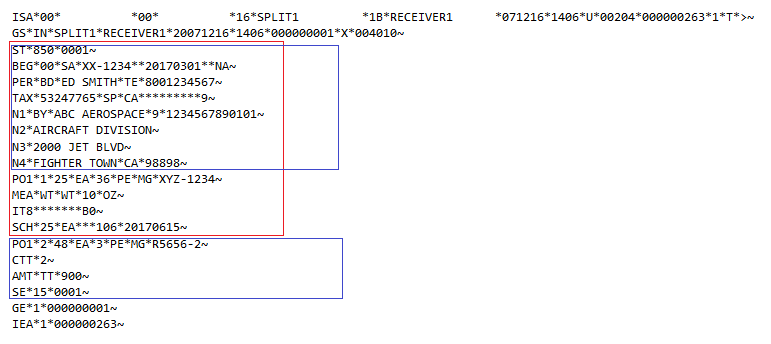
The first part contains the segments in red and the second part contains the segments in blue.
How to configure splitting for EDI files
Splitting EDI files with ediFabric .NET is a two step process:
- Annotate the repeating loop to split by with the [Splitter] attribute
- Configure the EDI Reader for splitting mode
Let's go over the steps in more detail using the example for X12 850 from above, splitting by the PO1 loop.
Note
You can split by any repeating loop in the EDI template, but the loop must be repeating, e.g. defined as a List<>, and only by one loop in the template, e.g. you can't split by multiple loops and only one loop can be annotated with the [Splitter] attribute.
-
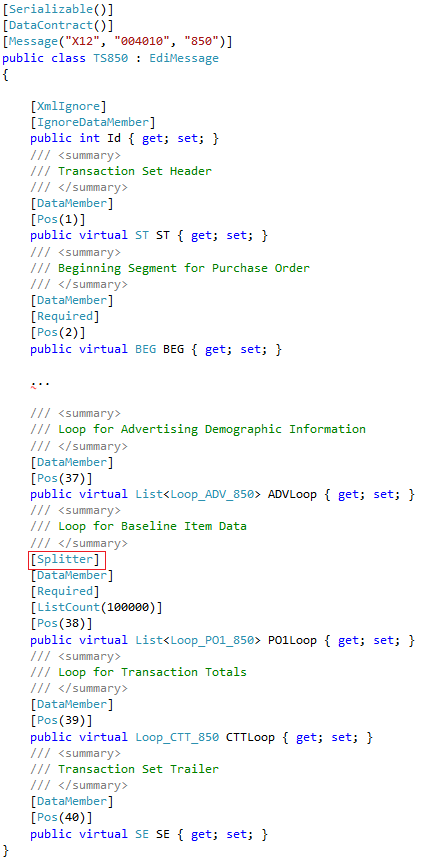
Add the [Splitter] attribute to a repeating loop in the EDI template
First, locate the EDI Template for 850 and locate the TS850 class. Then locate the order lines loop and annotate it with the [Splitter] attribute:
-
Enable the splitting mode in EDI Reader
X12
var reader = new X12Reader(edi, "Template",
    new X12ReaderSettings { Split = true });
EDIFACT
var reader = new EdifactReader(edi, "Template",
    new EdifactReaderSettings { Split = true });
HL7
var reader = new Hl7Reader(edi, "Template",
    new Hl7ReaderSettings { Split = true });
SCRIPT
var reader = new NcpdpScriptReader(edi, "Template",
    new NcpdpScriptReaderSettings { Split = true });
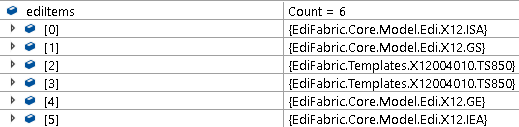
Running the above sample 850 message in debug mode results in two TS850 objects - one for each PO1 loop:
Examples in GitHub:
Deep copy EDI transactions
Sometimes it's useful to create a deep copy (or copies) of an existing EdiMessage and manually trim down any repetitions, e.g. when you've split by a top-level loop and need an additional breaking by a low-level loop.
To create a deep-copy of an EdiMessage use the Copy() method of EdiMessage. It copies all private, protected, and public fields, as well as the internal parsing and validation cache. The cache can be cleared by calling the ClearCache() method of EdiMessage. This reduces the size of the EdiMessage in memory and is useful when saving the message to a database or exporting it out to a CSV file.
X12
var newPO = po.Copy() as TS850;EDIFACT
var newPO = po.Copy() as TSORDERS;HL7
var newMedRecord = medRecord.Copy() as TSMDMT02;NCPDP
var newClaim = claim.Copy() as TSB1;SCRIPT
var newPharmacyRequest = pharmacyRequest.Copy() as TSREFREQ;