
Parse EDI files Last updated: 2024-08-23
Parsing EDI files with EDI Reader
Internally, translating an EDI file with ediFabric .NET is a three-step process:
- Identify the delimiters (from ISA, UNA, MSH, etc.)
- Match every EDI transaction to an EDI template
- For each EDI transaction, transpose its contents to the matching EDI template
The blue path below depicts the translation of an EDI file:
- An EDI file
- Is processed through an EDI reader (EdiFabric)
- To produce a list of .NET objects which are instances of EDI templates
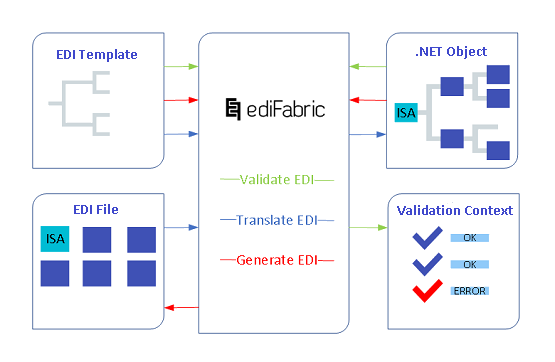
ediFabric .NET translates EDI files by implementing a DFS (depth-first-search) algorithm. EDI documents are transposed into C# instances of the corresponding EDI template class.
Note
To quickly parse an EDI file, download the C# examples, and head on to the Demo project in each solution.
All EDI readers provide fast, non-cached, forward-only access to EDI data. EDI reader methods let you move through EDI documents and read the contents of transactions and control segments.
All readers implement IDisposable and should be disposed of either directly or indirectly.
EDI separators
When parsing an EDI file, the reader first identifies the separators. Given that no separators can be found (invalid or missing UNA, UNB, ISA, or MSH segments), the reader will attempt to use the default separators for the standard instead. The separators are first used to identify segment endings and iterate through the segments in the EDI file. On each iteration, the reader returns an EdiItem, which can be either a control segment or an EDI transaction.
EDI readers
- X12Reader Reference - parses X12 or HIPAA EDI documents
- EdifactReader Reference - parses EDIFACT or EANCOM EDI documents
- Hl7Reader Reference - parses HL7 EDI documents
- NcpdpScriptReader Reference - parses NCPDP SCRIPT EDI documents
- NcpdpTelcoReader Reference - parses NCPDP Telecommunications documents
- VdaReader Reference - parses VDA documents
Properties of EDI readers
The properties of the class reflect the value of the current node, which is where the reader is positioned.
- CurrentInterchangeHeader property indicates the current interchange header segment.
- CurrentGroupHeader property indicates the current group header segment.
- CurrentSegmentIndex property counts how many segments have been read so far
- Item property indicates the current EDI transaction or control segment.
- Eof property indicates whether the reader is positioned at the end of the stream.
- Separators property holds the set of delimiters that were identified for this interchange.
- BytesRead property counts the offset in bytes since the last Read() was called.
Common EDI reader settings
All EDI readers can be configured with additional settings which change the behavior of the EDI reader.
- ReaderSettings Reference
- X12ReaderSettings Reference
- EdifactReaderSettings Reference
- Hl7ReaderSettings Reference
- NcpdpScriptReaderSettings Reference
- Encoding - this is the System.Encoding of the EDI file. UTF8 by default.
- ContinueOnError - this is to force the parser to continue past an exception. By default, parsing stops when an exception is encountered. See Reader exceptions and partial parsing.
- MaxSegmentLength - this is the maximum number of characters the parser can read before finding a segment terminator. When no segment terminator was found, the parser assumes the EDI stream is corrupt and terminates execution. It is also used in VDA and positional parsers to specify the set length of each segment. 5000 by default for EDIFACT and X12. 128 by default for VDA.
- Separators - this is the set of EDI separators to be used when reading EDI transactions. When used with EDI files that have valid envelopes, this property is overwritten by the delimiters found in the envelopes (ISA, UNA, MSH, etc.). See EDI separators.
- NoEnvelope - this flag tells the parser to not expect any envelopes (ISA, UNB, etc.) and that EDI transactions must be parsed using the delimiters specified in the Separators property. See Reading EDI transactions without an envelope.
- Split - When a template is marked for splitting it will still be translated as if it had not been marked. To explicitly enable splitting set this to True. See Reader modes and Split large EDI files.
- LeaveOpen - whether to close the underlying stream when the reader is disposed of. False by default.
- DataElementCodesMap - allows you to import external EDI codes at runtime. See What is DataElementCodesMap?.
Apply reader settings to EDI reader
X12
X12ReaderSettings settings = new X12ReaderSettings();
settings.ContinueOnError = true;
settings.Encoding = Encoding.UTF8;
settings.MaxSegmentLength = 5000;
settings.Separators = Separators.X12;
settings.Split = true;
settings.DataElementCodesMap = new public Dictionary<string, List<string>>();

using (var ediReader = new X12Reader(edi, "Templates", settings))
EDIFACT
EdifactReaderSettings settings = new EdifactReaderSettings ();
settings.ContinueOnError = true;
settings.Encoding = Encoding.UTF8;
settings.MaxSegmentLength = 5000;
settings.Separators = Separators.Edifact;
settings.Split = true;
settings.DataElementCodesMap = new public Dictionary<string, List<string>>();

using (var ediReader = new EdifactReader(edi, "Templates", settings))
HL7
Hl7ReaderSettings settings = new Hl7ReaderSettings();
settings.ContinueOnError = true;
settings.Encoding = Encoding.UTF8;
settings.MaxSegmentLength = 5000;
settings.Separators = Separators.X12;
settings.Split = true;
settings.DataElementCodesMap = new public Dictionary<string, List<string>>();

using (var ediReader = new Hl7Reader(edi, "Templates", settings))
SCRIPT
NcpdpScriptReaderSettings settings = new NcpdpScriptReaderSettings();
settings.ContinueOnError = true;
settings.Encoding = Encoding.UTF8;
settings.MaxSegmentLength = 5000;
settings.Separators = Separators.NcpdpScript;
settings.Split = true;
settings.DataElementCodesMap = new public Dictionary<string, List<string>>();

using (var ediReader = new NcpdpScriptReader(edi, "Templates", settings))
EDIFACT reader settings
The EDIFACT reader has an extra setting:
- EancomS3IsDefault - By default, all EANCOM transactions for version D01B are parsed according to the EANCOM Syntax 4. When this property is set to True, then EANCOM Syntax 3 is used.
NCPDP Telco and VDA reader settings
NCPDP Telco and VDA standards are flat files and do not require reader settings, like separators, etc. The file encoding can be specified directly as a parameter to the reader constructor.
What is DataElementCodesMap?
Let's illustrate this for Transaction Set Purpose Code, represented by the X12_ID_353 class in the X12 EDI template in version 4010, however, the principle is the same for any EDI code set.
The standard X12_ID_353 code set is defined as allowing the following values: 00, 18, and 19.
///
/// Transaction Set Purpose Code
///
[Serializable()]
[DataContract()]
[EdiCodes(",00,18,19,")]
 public class X12_ID_353
Let's assume that a fictional partner A requires a custom set of EDI codes for X12_ID_35, instead of the standard ones, which only allows the following values: 00, PA, and PB.
The templates using this class can be changed to use a new class, for partner A, however, the validation can be configured without any changes to the existing EDI template. The new values can be configured as a DataElementCodesMap in the ValidationSettings. This way IsValid() will match the new values instead of the standard values.
var codeSetMap = new Dictionary<string, List<string>>();
codeSetMap.Add("X12_ID_353", new List<string> { "00", "PA", "PB" });

ediMessage.IsValid(out errorContext,
     new ValidationSettings { DataElementCodesMap = codeSetMap });
Note
Use this method to dynamically load external code sets from a file, database, or another configuration source. No redeployment is required and the correct value resolution (by the code set class name) occurs at runtime.
The same map is also covered, with additional samples, in Validate EDI with templates.
Examples in GitHub:
Matching an EDI transaction to an EDI template
Before an EDI transaction could be parsed, the reader needs to identify the EDI template (or the C# class) that corresponds to that EDI transaction. This is required because the end result from the parsing of an EDI transaction is an instance of the EDI template (or a POCO).
There are two modes to bind an EDI transaction to an EDI template - either by MessageAttribute or by dependency injection.
Matching with MessageAttribute
When the EDI reader finds an EDI transaction, the following properties are noted:
- The transaction ID (for example 270 or ORDERS, or MDM)
- The transaction version (for example 4010, D96A, or, 2.6)
- The EDI standard (for example X12, EDIFACT, HL7)
Then the EDI reader searches for an EDI template, where all 3 properties above match the values in the MessageAttribute (the EDI standard value is inferred from the concrete instance of the EDI reader, the version and transaction ID from the contents of the EDI file):
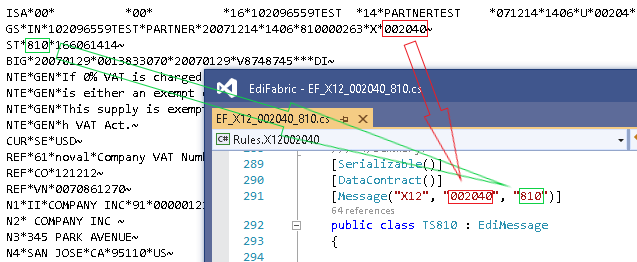
The EDI reader searches for a matching C# class through all the classes in the .NET assembly configured in the constructor. There are three overloads for configuring the assembly.
-
Assembly is not specified
When the assembly is not configured, the EDI reader will search for matching classes in the currently executing assembly.
var reader = new EdifactReader(ediStream) -
Assembly is specified by name
When the assembly is specified by name, the EDI reader will try to load it with Assembly.Load(), and then search it.
var reader = new EdifactReader(ediStream, "EdiFabric.Templates.Edifact") -
Assembly is specified by a factory
To dynamically return an assembly, use a factory. This is useful when you use different assemblies for different EDI versions or trading partners.
var reader = new X12Reader(ediStream, AssemblyLoadFactory)

private static Assembly AssemblyLoadFactory(MessageContext messageContext)
{
   //  Resolve by sender
   if (messageContext.SenderId == "PartnerA")
       return Assembly.Load("EdiFabric.Rules.PartnerA");

   //  Resolve by version
   if (messageContext.Version == "004010")
       return Assembly.Load("EdiFabric.Rules.X12004010");

   throw new System.Exception(
     string.Format("Version {0} is not supported." messageContext.Version));
}
MessageContext
The message context contains useful information on how to identify the transaction type, version, and sender or receiver.
Matching with dependency injection
The EdiReader can be configured to bind EDI transactions directly to .NET classes (EDI templates), instead of .NET assemblies. This mode skips over matching MessageAttribute values and provides better overall performance. The factory determines which EDI template to instantiate, based on the data in the control segments and the transaction header segment.
X12
var ediReader = new X12Reader(ediStream, TypeFactory)

private static TypeInfo TypeFactory(ISA isa, GS gs, ST st)
{
   if(st.TransactionSetIdentifierCode_01 == "810")
       return typeof(TS810).GetTypeInfo();

   throw new Exception("Unsupported transaction.");
}
EDIFACT
var ediReader = new EdifactReader(ediStream, TypeFactory)

private static TypeInfo TypeFactory(UNB unb, UNG ung, UNH unh)
{
   if(unh.MessageIdentifier_02.MessageType_01 == "INVOIC")
       return typeof(TSINVOIC).GetTypeInfo();

   throw new Exception("Unsupported transaction.");
}
HL7
var ediReader = new Hl7Reader(ediStream, TypeFactory)

TypeInfo TypeFactory(FHS fhs, BHS bhs, MSH msh)
{
    if (msh.MessageType_08.MessageCode_01 == "QBP" &&
            msh.MessageType_08.TriggerEvent_02 == "Q21")
        return typeof(TSQBPQ21).GetTypeInfo();

   throw new Exception("The transaction is not supported.");
}
NCPDP
var ediReader = new NcpdpTelcoReader(ediStream, TypeFactory)

TypeInfo TypeFactory(TransmissionHeader transmissionHeader,
                         TransactionHeader transactionHeader,
                             ResponseHeader responseHeader)
{
    if (transactionHeader != null &&
            transactionHeader.TransactionCode_4 == "B1" &&
                transactionHeader.VersionReleaseNumber_3 == "D0")
        return typeof(TSB1).GetTypeInfo();

   throw new Exception("The transaction is not supported.");
}
SCRIPT
var ediReader = new NcpdpScriptReader(ediStream, TypeFactory)

TypeInfo TypeFactory(UIB interchangeHeader, UIH messageHeader)
{
    if (messageHeader.MESSAGEIDENTIFIER_01.MessageFunction_04 == "PASCHG")
        return typeof(TSPASCHG).GetTypeInfo();

   throw new Exception("The transaction is not supported.");
}
VDA
var ediReader = new VdaReader(ediStream, MessageContextTypeFactory);

private MessageContext MessageContextTypeFactory(string segment)
{
    var id = segment.Substring(0, 5);
    switch (id)
    {
        case "51102":
	    return new MessageContext("4905", segment.Substring(29, 5), "1", null, "VDA",
                null, typeof(TS4905).GetTypeInfo(), null, null, null, null);
    }

    return null;
}
Reader exceptions and partial parsing
There are two types of failures that the EDI reader can encounter - when the EDI file can't be read at all, and when an EDI transaction can't be parsed to its corresponding EDI template.
EDI file can't be parsed
In the event that the EDI file is corrupt and can't be read at all, EdiReader does not throw exceptions but instead returns a ReaderErrorContext. No EDI transactions can be matched to EDI templates.
var readerErrors = ediItems.OfType<ReaderErrorContext>();
if (readerErrors.Any())
{
   //  The stream is corrupt. Reject it and report back to the sender
   foreach(var readerError in readerErrors)
   {
       //  Respond with the error context,
       //  which contains the standard EDI error code and fault reason
       var error = readerError.MessageErrorContext.Flatten();
   }
}An EDI transaction within the EDI file can't be parsed
In this case, the EDI transaction has been matched to an EDI template, however, it can't be parsed to its .NET POCO due to reaching any of these conditions:
- An unrecognizable segment (the segment ID does not correspond to a segment class in the EDI template)
- An improperly positioned segment (the segment is not in the expected position according to the EDI template)
- A segment that can't be parsed (the segment has more data elements than specified in the EDI template)
Upon reaching any of the conditions above, the parsing of the EDI file stops, and the ErrorContext property of EdiMessage (the base class of every .NET POCO) is populated with the relevant error details, and the HasErrors property of EdiMessage is set to true.
The HasErrors property of EdiMessage indicates if the message was parse without problems (HasErrors = false) or partially parsed (HasErrors = true).
Note
EdiReader supports a Continue-On-Error mode which forces the EDI parser to continue towards the end of the EDI file regardless of any errors. To enable it, set the ContinueOnError parameter of the reader settings to true.
Reader modes
All EDI readers provide three modes for translating EDI files:
- Reading an EDI file in full, or read to end mode (sync and async)
- Reading an EDI file one EDI transaction at a time, or streaming mode (syn and async)
- Splitting an EDI file by EDI transaction and by a repeating loop within that transaction, or splitting mode
The first two modes will be covered in this article, for the splitting mode, go to Read large EDI files by splitting article.
Read to end
In this mode, the EDI reader reads all control segments together with all EDI transactions, from the start to the end of the EDI file. This is memory intensive operation because the whole file is loaded in the memory and should only be used to read reasonably sized EDI files (up to 3 MB).
X12
var ediStream = File.OpenRead(@"C:\x12.edi");
List<IEdiItem> ediItems;
using(var reader = new X12Reader(ediStream, "EdiFabric.Templates.X12"))
   ediItems = reader.ReadToEnd().ToList();
EDIFACT
var ediStream = File.OpenRead(@"C:\edifact.edi");
List<IEdiItem> ediItems;
using(var reader = new EdifactReader(ediStream, "EdiFabric.Templates.Edifact"))
   ediItems = reader.ReadToEnd().ToList();
HL7
var ediStream = File.OpenRead(@"C:\hl7.edi");
List<IEdiItem> ediItems;
using(var reader = new Hl7Reader(ediStream, "EdiFabric.Templates.Hl7"))
   ediItems = reader.ReadToEnd().ToList();
NCPDP
var ediStream = File.OpenRead(@"C:\ncpdp.edi");
List<IEdiItem> ediItems;
using(var reader = new NcpdpTelcoReader(ediStream, "EdiFabric.Templates.Ncpdp"))
   ediItems = reader.ReadToEnd().ToList();
SCRIPT
var ediStream = File.OpenRead(@"C:\script.edi");
List<IEdiItem> ediItems;
using(var reader = new NcpdpScriptReader(ediStream, "EdiFabric.Templates.Ncpdp"))
   ediItems = reader.ReadToEnd().ToList();
VDA
var ediStream = File.OpenRead(@"C:\vda.edi");
List<IEdiItem> ediItems;
using(var reader = new VdaReader(ediStream, (string segment) => return new MessageContext("4905", null, "1", null, "VDA", null, null, "", null, "",
                mc => Assembly.Load(new AssemblyName("EdiFabric.Rules.Vda")));))
   ediItems = reader.ReadToEnd().ToList();
Examples in GitHub:
- Read X12 file to end example
- Read X12 file to end example - async
- Read EDIFACT file to end example
- Read EDIFACT file to end example - async
- Read HL7 file to end example
- Read HL7 file to end example - async
- Read NCPDP Telco file to end example
- Read NCPDP Telco file to end example - async
- Read NCPDP SCRIPT file to end example
- Read NCPDP SCRIPT file to end example - async
- Read VDA file to end example
- Read VDA file to end example - async
Read one EDI transaction at a time
In this mode, the EDI reader returns at the end of each parsed EDI transaction or control segment. It needs to be executed in a loop until the whole file is read.
X12
var ediStream = File.OpenRead(@"C:\x12.edi");
using(var reader = new X12Reader(ediStream, "EdiFabric.Templates.X12"))
{
   while(reader.Read())
   {
       ISA isa = ediReader.Item as ISA;
       if (isa != null)
       {
           //  Handle isa downstream
       }

       GS gs = ediReader.Item as GS;
       if (gs != null)
       {
           //  Handle gs downstream
       }

       TS810 invoice = ediReader.Item as TS810;
       if(invoice != null)
       {
           //  Handle invoice downstream
       }

       TS850 purchaseOrder = ediReader.Item as TS850;
       if (purchaseOrder != null)
       {
           //  Handle purchaseOrder downstream
       }
   }
}
EDIFACT
var ediStream = File.OpenRead(@"C:\edifact.edi");
using(var reader = new EdifactReader(ediStream, "EdiFabric.Templates.Edifact"))
{
   while(reader.Read())
   {
       UNB unb = ediReader.Item as UNB;
       if (unb != null)
       {
           //  Handle unb downstream
       }

       UNG ung = ediReader.Item as UNG;
       if (ung != null)
       {
           //  Handle ung downstream
       }

       TSINVOIC invoice = ediReader.Item as TSINVOIC;
       if(invoice != null)
       {
           //  Handle invoice downstream
       }

       TSORDERS purchaseOrder = ediReader.Item as TSORDERS;
       if (purchaseOrder != null)
       {
           //  Handle purchaseOrder downstream
       }
   }
}
HL7
using (var hl7Reader = new Hl7Reader(hl7Stream, "EdiFabric.Templates.Hl7"))
{
	while (hl7Reader.Read())
	{
		//  3. Check if current item is dispense
		var dispense = hl7Reader.Item as TSRDSO13;
		if (dispense != null)
		{
			//  Handle dispense downstream
		}
	}
}
NCPDP
using (var ncpdpReader = new NcpdpTelcoReader(ncpdpStream, "EdiFabric.Templates.Ncpdp"))
{
	while (ncpdpReader.Read())
	{
		//  Process dispenses if no parsing errors
		var claim = ncpdpReader.Item as TSB1;
		if (claim != null && !claim.HasErrors)
			// Handle claim async
	}
}
SCRIPT
using (var ncpdpReader = new NcpdpScriptReader(ncpdpStream, "EdiFabric.Templates.Ncpdp"))
{
	while (ncpdpReader.Read())
	{
		//  Process prescription request if no parsing errors
		var pr = ncpdpReader.Item as TSNEWRX;
		if (pr != null && !pr.HasErrors)
			// Handle prescription request downstream
	}
}
VDA
using (var ediReader = new VdaReader(ediStream, MessageContextFactory))
{
	while (ediReader.Read())
	{
		ediItems.Add(ediReader.Item);
	}
}
Examples in GitHub:
- Read X12 file with streaming example
- Read X12 file with streaming example - async
- Read EDIFACT file with streaming example
- Read EDIFACT file with streaming example - async
- Read HL7 file with streaming example
- Read HL7 file with streaming example - async
- Read NCPDP Telco file with streaming example
- Read NCPDP Telco file with streaming example - async
- Read NCPDP SCRIPT file with streaming example
- Read NCPDP SCRIPT file with streaming example - async
Reading EDI transactions without an envelope
Sometimes an EDI file might contain one or more EDI transactions but no envelopes at all. There is no additional configuration required for HL7, VDA, and the NCPDP Telecommunications standards, however, for X12, EDIFACT, and NCPDP SCRIP a manual configuration is required.
The reason is that EDI separators are identified from the envelopes and given they are missing, the separators need to be set separately in the EDI reader.
To do so, set the NoEnvelope property of the reader settings to true. This tells the reader to use the default separator for the standard. In case a custom set of separators is needed, pass it to the reader settings too.
X12
var ediStream = File.OpenRead(@"C:\x12.edi");
var settings = new X12ReaderSettings() { NoEnvelope = true };
List ediItems;
using(var reader = new X12Reader(ediStream, X12Factory, settings))
   ediItems = reader.ReadToEnd().ToList();
EDIFACT
var ediStream = File.OpenRead(@"C:\edifact.edi");
var settings = new EdifactReaderSettings() { NoEnvelope = true };
List ediItems;
using(var reader = new EdifactReader(ediStream, EdifactFactory, settings))
    ediItems = reader.ReadToEnd().ToList();
SCRIPT
Stream ncpdpStream = File.OpenRead(Directory.GetCurrentDirectory() + @"\..\..\..\Files\PrescriptionRequestNoEnvelope_NEWRX.txt");

List<IEdiItem> ncpdpItems;
using (var ncpdpReader = new NcpdpScriptReader(ncpdpStream, "EdiFabric.Templates.Ncpdp", new NcpdpScriptReaderSettings { NoEnvelope = true }))
	ncpdpItems = ncpdpReader.ReadToEnd().ToList();

var prescriptionRequests = ncpdpItems.OfType<TSNEWRX>();
Examples in GitHub: