
Generate X12 997 Last updated: 2026-11-03
Generate X12 997 with the HTTP POST Method
You can generate an X12 997 acknowledgment for an X12Interchange by using the HTTP POST method. The request body must be an X12Interchange. Execute HTTP POST to the resource URL, with the request included as application/json content.
- URL:
https://api.edination.com/v2/x12/ack - Header:
Ocp-Apim-Subscription-Key: {API key} - Request: X12Interchange
- Response: X12Interchange
The response will contain an X12Interchange, encoded in application/json format, which represents the 997 acknowledgments with the original ISA and GS, where the sender and receiver had been swapped and the ISA reference number (ISA13) had been set to 1. By default all functional acknowledgments will be batched in the same interchange and TA1 will be included as per the ISA14 flag.
Example with Postman:
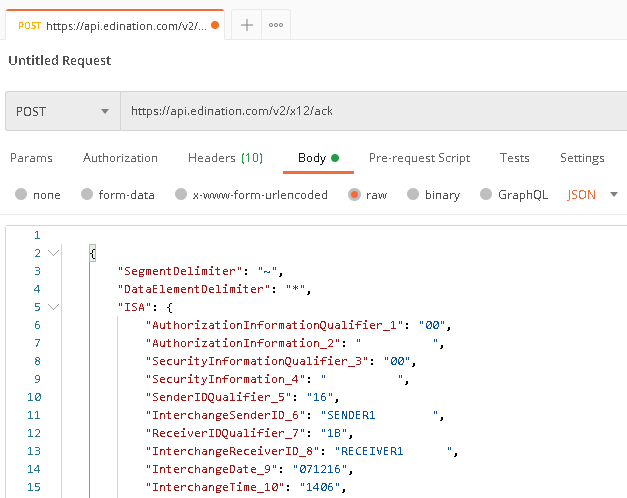
The steps above are for API v2. API v3 supports X12 only for now. On v3, generate the 997 from a raw X12 file with Parse X12 in mode 3, with ack.gen997 set to true in config, because the default on v3 is a 999. The call counts as one operation and returns the JSON, the validation results and the acknowledgment.
curl -X POST "https://api.edination.com/v3/x12/parse?mode=3&config=%7B%22ack%22%3A%7B%22gen997%22%3Atrue%7D%7D" \
  -H "Ocp-Apim-Subscription-Key: YOUR_API_KEY" \
  -H "Content-Type: application/octet-stream" \
  -D headers.txt -o response.bin \
  --data-binary @purchase-order.edi
The acknowledgment is the raw X12 in ack in the validation report, which starts at the offset in the X-EdiFabric-Offset header.