
EDIFACT Control Segments Last updated: 2026-10-09
Structure of EDIFACT envelopes
An EDIFACT interchange nests three envelopes. Each one opens with a header segment and closes with a trailer segment. The trailer repeats the reference from the header and counts what is inside, so the receiver can tell when something is missing or was cut off.
- Interchange, UNB to UNZ. One transmission from one sender to one recipient. An optional UNA segment in front of UNB sets the separators.
- Functional group, UNG to UNE. Optional. A group holds messages of one type. Without groups, the messages sit directly in the interchange.
- Message, UNH to UNT. One business document, such as an ORDERS or an INVOIC.
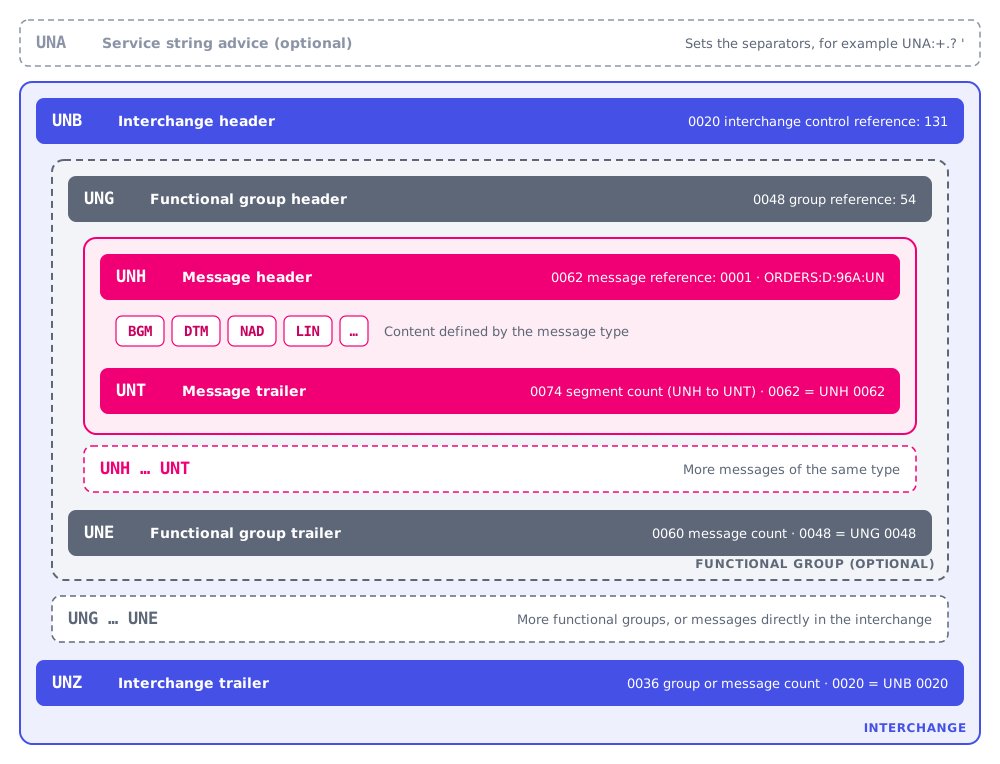
Control segments and what the receiver checks
The receiver checks every header and trailer pair. When a check fails, the CONTRL acknowledgment reports it with one of the error codes in the last column. The CONTRL page shows which codes ediFabric .NET reports.
| Segment | Name | Usage | What must be right | CONTRL error codes |
|---|---|---|---|---|
| UNA | Service string advice | Optional | Six service characters: component separator, data element separator, decimal mark, release character, a reserved space and the segment terminator. | 20, 22 |
| UNB | Interchange header | Mandatory | Syntax identifier, sender, recipient, date and time, and the interchange control reference (0020), which must be unique for the sender. | 2, 12, 13, 26 |
| UNG | Functional group header | Optional | The message type of the group and the group reference (0048). A group holds only one message type. | 31 |
| UNH | Message header | Mandatory | The message reference (0062) and the message type, version, release and agency, for example ORDERS:D:96A:UN. | 12, 13, 26 |
| UNT | Message trailer | Mandatory | The number of segments from UNH to UNT inclusive (0074). The message reference must equal UNH 0062. | 28, 29 |
| UNE | Functional group trailer | Mandatory when UNG is used | The number of messages in the group (0060). The group reference must equal UNG 0048. | 28, 29 |
| UNZ | Interchange trailer | Mandatory | The number of groups, or of messages when there are no groups (0036). The control reference must equal UNB 0020. | 28, 29 |
To ask the recipient for a CONTRL, set the acknowledgment request in UNB (0031) to 1. To secure messages with a digital signature, see EDIFACT AUTACK.
UNA service string advice
You don't have to write the UNA segment yourself. EdifactWriter detects when the separators differ from the defaults and writes the matching UNA.
To write UNA explicitly, use the Write() overload that takes a UNA. To create one, populate it manually or call ToUna() on a Separators object. The example below writes an invoice with | as the segment terminator.
 var invoice = EdifactTransactionBuilders.BuildInvoice("1");

 using (var stream = new MemoryStream())
 {
	using (var writer = new EdifactWriter(stream))
	{
		//  Set a custom segment separator
		var separators = new Separators('|',
                          Separators.Edifact.ComponentDataElement,
			  Separators.Edifact.DataElement,
                          Separators.Edifact.RepetitionDataElement,
                          Separators.Edifact.Escape);

                //  Write custom UNA
		writer.Write(separators.ToUna());

		//  Write the UNB with the custom separator set
		writer.Write(SegmentBuilders.BuildUnb("1"), separators);
		writer.Write(invoice);
	}
 }
Object reference: UNA.
Generate the UNB interchange header in C#
This method builds a UNB with ediFabric .NET. Pass a new interchange control reference for every interchange, and use the same value in UNZ.
///
/// Build UNB.
///
public static UNB BuildUnb(string controlNumber)
{
	return new UNB
	{
		SYNTAXIDENTIFIER_1 = new S001
		{
			//  Syntax Identifier
			SyntaxIdentifier_1 = "UNOB",
			//  Syntax Version Number
			SyntaxVersionNumber_2 = "1"
		},
		INTERCHANGESENDER_2 = new S002
		{
			//  Interchange sender identification
			InterchangeSenderIdentification_1 = "SENDERID",
			//  Identification code qualifier
			IdentificationCodeQualifier_2 = "01",
			//  Interchange sender internal identification
			InterchangeSenderInternalIdentification_3 = "ZZZ"
		},
		INTERCHANGERECIPIENT_3 = new S003
		{
			//  Interchange recipient identification
			InterchangeRecipientIdentification_1 = "RECEIVERID",
			//  Identification code qualifier
			IdentificationCodeQualifier_2 = "16",
			//  Interchange recipient internal identification
			InterchangeRecipientInternalIdentification_3 = "ZZZ"
		},
		DATEANDTIMEOFPREPARATION_4 = new S004
		{
			//  Date
			Date_1 = DateTime.Now.Date.ToString("yyMMdd"),
			//  Time
			Time_2 = DateTime.Now.TimeOfDay.ToString("hhmm")
		},
		//  Interchange control reference
		InterchangeControlReference_5 = controlNumber
	};
}Generate the UNG functional group header in C#
Only build a UNG when your trading partner uses functional groups. The group reference must be unique in the interchange, and UNE repeats it.
///
/// Build UNG.
///
public static UNG BuildUng(string controlNumber, string transactionType)
{
	return new UNG
	{
		//  The type of messages in the group, INVOIC, etc.
		MessageGroupIdentification_1 = transactionType,
		APPLICATIONSENDERIDENTIFICATION_2 = new S006
		{
			//  Sender identification
			ApplicationSenderIdentification_1 = "SENDERID",
			IdentificationCodeQualifier_2 = "ZZZ"
		},
		APPLICATIONRECIPIENTIDENTIFICATION_3 = new S007
		{
			//  Recipient identification
			ApplicationRecipientIdentification_1 = "RECEIVERID",
			IdentificationCodeQualifier_2 = "ZZZ"
		},
		DATEANDTIMEOFPREPARATION_4 = new S004
		{
			//  Date
			Date_1 = DateTime.Now.Date.ToString("yyMMdd"),
			//  Time
			Time_2 = DateTime.Now.TimeOfDay.ToString("hhmm")
		},
		//  Group control reference
		GroupReferenceNumber_5 = controlNumber,
		//  Controlling agency
		ControllingAgency_6 = "UN"
	};
}EDIFACT control segments in ediFabric .NET
Each control segment is a class in ediFabric .NET:
The examples above are part of the ediFabric .NET C# code examples.
The EDIFACT envelope in ediFabric Cloud JSON
ediFabric Cloud represents an interchange as an EdifactInterchange object. POST /edifact/read returns an array of them, and /edifact/write, /edifact/validate and /edifact/ack take one. The Result object reports the outcome of the operation.
{
    "UNB": {
        "SYNTAXIDENTIFIER_1": {
            "SyntaxIdentifier_1": "UNOB",
            "SyntaxVersionNumber_2": "1"
        },
        "INTERCHANGESENDER_2": {
            "InterchangeSenderIdentification_1": "SENDER1",
            "IdentificationCodeQualifier_2": "14",
            "InterchangeSenderInternalIdentification_3": "ZZUK"
        },
        "INTERCHANGERECIPIENT_3": {
            "InterchangeRecipientIdentification_1": "RECEIVER1",
            "IdentificationCodeQualifier_2": "1",
            "InterchangeRecipientInternalIdentification_3": "ZZUK"
        },
        "DATEANDTIMEOFPREPARATION_4": {
            "Date_1": "071101",
            "Time_2": "1701"
        },
        "InterchangeControlReference_5": "131",
        "ApplicationReference_7": "ORDERS",
        "AcknowledgementRequest_9": "1",
        "TestIndicator_11": "1"
    },
    "Groups": [{
        "Transactions": [{
            "UNH": {
                "MessageReferenceNumber_01": "000000101",
                "MessageIdentifier_02": {
                    "MessageType_01": "ORDERS",
                    "MessageVersionNumber_02": "D",
                    "MessageReleaseNumber_03": "96A",
                    "ControllingAgencyCoded_04": "UN"
                }
            },
            "_comment": "... model specific content goes here ...",
            "UNT": {
                "NumberofSegmentsinaMessage_01": "38",
                "MessageReferenceNumber_02": "000000101"
            },
            "Model": "EdiNation.Edifact.UN.D96A"
        }]
    }],
    "UNZTrailers": [{
        "InterchangeControlCount_1": "1",
        "InterchangeControlReference_2": "131"
    }],
    "Result": {
        "LastIndex": 40,
        "Details": [],
        "Status": "success"
    }
}
Each control segment maps to a JSON object:
| Segment | JSON |
|---|---|
| UNA | UNA, present only when a separator differs from the default |
| UNB | UNB |
| UNG and UNE | Groups, a list of EdifactGroup objects, each with a UNG and UNETrailers |
| UNH and UNT | UNH and UNT in each item of Transactions, with the message content between them |
| UNZ | UNZTrailers |
ediFabric Native doesn't support EDIFACT yet. See the ediFabric Native introduction for the standards that are available.